1. Python apps in the DevOps world
Python is everywhere in DevOps: web APIs (Flask, Django, FastAPI), data and ML jobs, automation scripts and many internal tools. Unlike Java or .NET, Python usually has no compile step — the "build" is mostly installing the right packages into the right place, then running the app with a proper production server.
python3 --version     # Python 3.12.4
pip --version         # pip 24.x — Python's package installer
How to recognise a Python project — look for one of these in the repo root:
requirements.txt— the classic list of packages.pyproject.toml— the modern project file (Poetry, uv, or plain pip).manage.py→ a Django app.app.py,main.pyorwsgi.py→ often Flask or FastAPI.
2. requirements.txt and pip
flask==3.0.3
gunicorn==22.0.0
psycopg2-binary==2.9.9
requests>=2.31,<3
python-dotenv==1.0.1
pip install -r requirements.txt      # install everything in the list
pip freeze > requirements.txt        # write the exact versions currently installed
pip list                             # what's installed
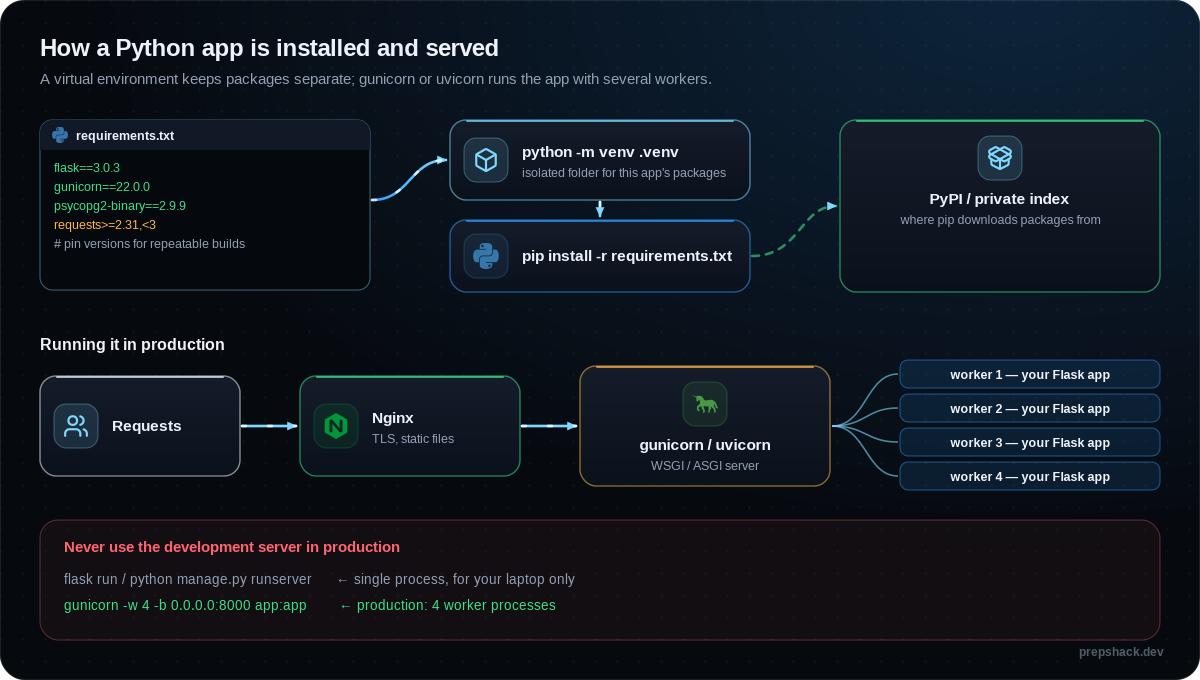
==pins an exact version — the safest choice for repeatable builds.>=2.31,<3allows a range.- Packages are downloaded from PyPI (the Python Package Index) — or from a company's private index (Nexus, Artifactory, AWS CodeArtifact) configured with
--index-urlorpip.conf.
If versions aren't pinned, the same
requirements.txtcan install different packages next month, and the app breaks without anyone changing a line of code. Pin versions, or use a lockfile (section 7).
3. Virtual environments
A virtual environment (venv) is a private folder of Python packages for one project. Without it, every project on the machine shares one global set of packages — and project A needing flask 2 while project B needs flask 3 becomes a mess.
python3 -m venv .venv            # create the environment in a folder called .venv
source .venv/bin/activate        # activate it (Windows: .venv\Scripts\activate)
pip install -r requirements.txt  # packages now go into .venv, not the system
which python                     # → /path/to/project/.venv/bin/python
deactivate                       # leave the environment
- Add
.venv/to.gitignore. Never commit it. - On many modern Linux distros, installing packages system-wide with
pipis blocked ("externally-managed-environment") — another reason to always use a venv. - In Docker, you can skip the venv because the container itself is the isolation, or use one in a multi-stage build to copy just the installed packages.
4. Running the frameworks
Flask
# app.py
import os
from flask import Flask
app = Flask(__name__)

@app.get("/health")
def health():
    return {"status": "ok"}
flask --app app run --debug # development server (your laptop only)
Django
python manage.py migrate           # create/update database tables
python manage.py collectstatic     # gather CSS/JS for Nginx to serve
python manage.py runserver         # development server only
Django settings usually come from settings.py reading environment variables: DEBUG, SECRET_KEY, ALLOWED_HOSTS, DATABASE_URL. DEBUG must be False in production — debug pages leak secrets.
FastAPI
# main.py
from fastapi import FastAPI
app = FastAPI()

@app.get("/health")
def health():
    return {"status": "ok"}
uvicorn main:app --reload # development, auto-reload on code changes
5. Production servers: gunicorn and uvicorn
The built-in servers (flask run, runserver) handle one request at a time and aren't built for security or load. In production you put the app behind a real application server:
- gunicorn — for WSGI apps (Flask, Django). Runs several worker processes, so many requests are handled in parallel.
- uvicorn — for ASGI apps (FastAPI, async Django). Often run under gunicorn to get multiple workers.
gunicorn -w 4 -b 0.0.0.0:8000 app:app                      # Flask: module app.py, object app
gunicorn -w 4 -b 0.0.0.0:8000 myproject.wsgi:application   # Django
gunicorn -w 4 -k uvicorn.workers.UvicornWorker -b 0.0.0.0:8000 main:app   # FastAPI
uvicorn main:app --host 0.0.0.0 --port 8000 --workers 4    # FastAPI, uvicorn alone
app:appmeans "in the fileapp.py, use the object calledapp".- A common starting point for workers is (2 × CPU cores) + 1. In Kubernetes, many teams run fewer workers per pod and scale the number of pods instead.
- Usually Nginx (or a load balancer / Ingress) sits in front: it handles TLS, slow clients and static files, and forwards requests to gunicorn.
6. Configuration with environment variables
import os

DATABASE_URL = os.environ["DATABASE_URL"]               # required — crash early if missing
DEBUG = os.getenv("DEBUG", "false").lower() == "true"    # optional with a default
Locally, developers keep these in a .env file loaded by python-dotenv. In production they come from the environment — a Kubernetes Secret, ECS task definition or App Service settings. The .env file is never committed.
7. pyproject.toml, Poetry and uv
Newer projects use pyproject.toml instead of (or as well as) requirements.txt:
[project]
name = "shop-api"
version = "1.2.0"
requires-python = ">=3.12"
dependencies = [
  "fastapi>=0.111",
  "uvicorn[standard]>=0.30",
  "sqlalchemy>=2.0",
]

[project.optional-dependencies]
dev = ["pytest", "ruff"]
Tools that use it:
| Tool | Lockfile | Install command |
|---|---|---|
| pip | (none — use pinned requirements) | pip install . |
| Poetry | poetry.lock |
poetry install --no-root |
| uv | uv.lock |
uv sync --frozen |
uv is a very fast newer tool that replaces pip, venv and Poetry in one; many teams are moving to it because installs take seconds.
Wheels (.whl files) are pre-built packages. Some packages (like psycopg2) need C compilers to build from source; wheels avoid that. If a Docker build fails with "gcc not found", the package had no wheel for your platform — install build tools in the build stage or pick a -binary variant.
8. Pipeline and Docker
CI steps
- uses: actions/setup-python@v5
  with: { python-version: '3.12', cache: pip }
- run: pip install -r requirements.txt -r requirements-dev.txt
- run: ruff check .                 # lint
- run: pytest -q --junitxml=report.xml
Dockerfile
FROM python:3.12-slim
ENV PYTHONDONTWRITEBYTECODE=1 PYTHONUNBUFFERED=1
WORKDIR /app

COPY requirements.txt .
RUN pip install --no-cache-dir -r requirements.txt   # cached layer unless requirements change

COPY . .
RUN useradd -m appuser
USER appuser
EXPOSE 8000
CMD ["gunicorn", "-w", "4", "-b", "0.0.0.0:8000", "app:app"]
PYTHONUNBUFFERED=1makes logs appear immediately indocker logs/kubectl logsinstead of being held in a buffer.--no-cache-dirkeeps pip's download cache out of the image.- Copying
requirements.txtfirst means code changes don't trigger a full reinstall.
9. Common problems
| Problem | Cause | Fix |
|---|---|---|
ModuleNotFoundError: No module named 'flask' |
Packages installed in a different environment | Activate the venv, or install in the image |
externally-managed-environment |
System Python blocks global pip installs | Use a venv |
| Build fails compiling a package | No wheel available, missing gcc/headers | Install build tools in build stage, or use a binary package |
| Logs don't show up in Kubernetes | Output is buffered | Set PYTHONUNBUFFERED=1 |
Works with flask run, slow under load |
Using the dev server in production | Use gunicorn / uvicorn with workers |
| Worker timeouts | Slow requests exceed gunicorn's 30s default | Fix the slow call, or tune --timeout |
10. Key terms at a glance
| Term | Meaning in one line |
|---|---|
| pip | Python's package installer |
| PyPI | The public Python package index |
| requirements.txt | List of packages (and versions) to install |
| venv | Private package folder for one project |
| pyproject.toml | Modern Python project file |
| WSGI / ASGI | Standard interfaces between servers and sync / async apps |
| gunicorn | Production WSGI server with worker processes |
| uvicorn | ASGI server for FastAPI and async apps |
| Wheel | A pre-built Python package (.whl) |
| Poetry / uv | Tools that manage dependencies with a lockfile |