1. Node.js in the DevOps world
Node.js lets JavaScript run on a server, outside the browser. It's used for two very different kinds of app, and you need to know which one you're dealing with:
- Backend APIs — Express, NestJS, Fastify. A long-running process that listens on a port (often 3000).
- Frontends — React, Vue, Angular, Next.js. Node is used to build them into static files (HTML, CSS, JS) that a web server or CDN serves. Node often isn't needed at runtime at all.
node -v      # v22.11.0 — the Node version
npm -v       # 10.9.0  — npm comes with Node
Match the Node version. Projects often say which version they need in
.nvmrc,.node-versionor the"engines"field of package.json. A mismatch causes strange build errors. Use the same version in your CI and Docker image.
2. package.json: the heart of every Node project
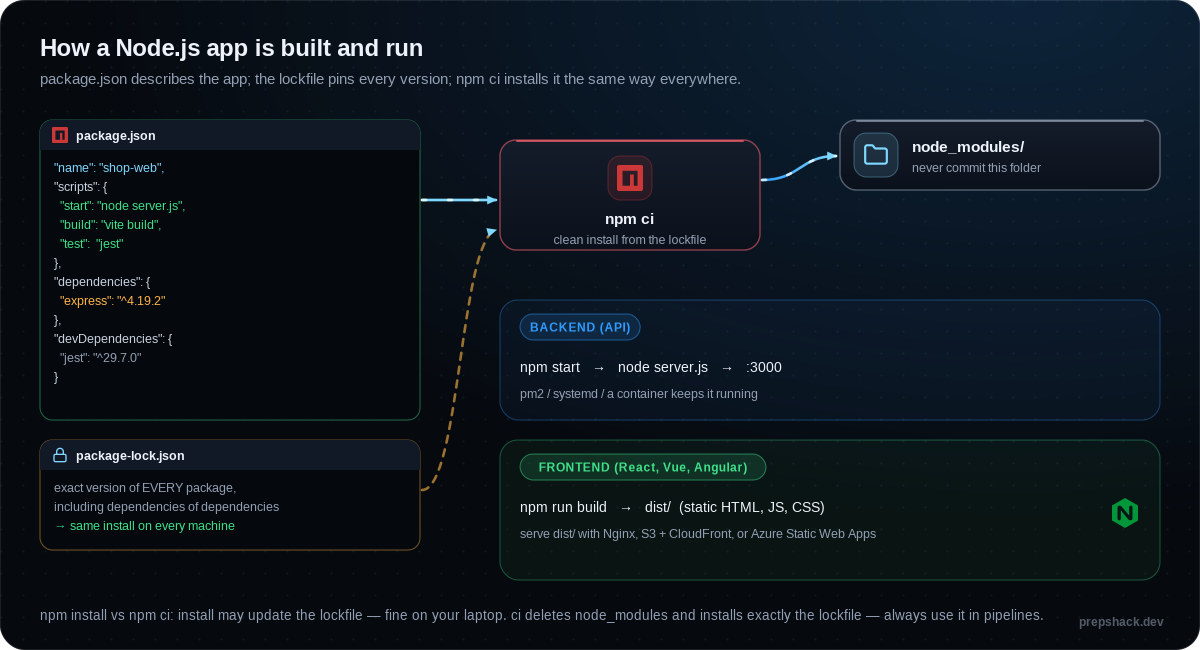
If you see package.json in the repo root, it's a Node project. It lists the app's name, its dependencies and the commands to build and run it.
{
  "name": "shop-api",
  "version": "2.3.1",
  "main": "server.js",
  "engines": { "node": ">=22" },
  "scripts": {
    "start": "node server.js",
    "dev":   "nodemon server.js",
    "build": "tsc -p .",
    "test":  "jest --ci",
    "lint":  "eslint ."
  },
  "dependencies": {
    "express": "^4.19.2",
    "pg": "^8.12.0"
  },
  "devDependencies": {
    "jest": "^29.7.0",
    "nodemon": "^3.1.0",
    "typescript": "^5.5.0"
  }
}
What each part means:
scripts— named commands.npm startruns thestartscript; anything else runs withnpm run <name>(for examplenpm run build,npm run lint). Always read the scripts first — they tell you exactly how the developers build, test and start the app.dependencies— libraries needed when the app runs in production.devDependencies— tools needed only to develop, test or build (test frameworks, TypeScript, linters). They don't need to be in the production image.
What do ^ and ~ mean?
"^4.19.2"— any 4.x.x version that's 4.19.2 or newer (minor and patch updates allowed)."~4.19.2"— any 4.19.x (only patch updates)."4.19.2"— exactly this version.
This flexibility is why the lockfile exists.
3. package-lock.json and why it matters
package-lock.json records the exact version of every package installed — including the dependencies of your dependencies. A typical app has 20 direct dependencies but 800+ packages in total.
Without a lockfile, npm install today and npm install next week can install different versions, and a build that worked yesterday breaks today. With a lockfile, every machine — your laptop, CI, the Docker build — installs exactly the same thing.
Rule: always commit package-lock.json. Never commit node_modules/.
(Yarn uses yarn.lock; pnpm uses pnpm-lock.yaml. Same idea.)
4. npm install vs npm ci
This is a favourite interview question.
npm install |
npm ci |
|
|---|---|---|
| Reads | package.json (and the lockfile) | Only the lockfile |
| Can change the lockfile? | Yes | Never — fails if out of sync |
node_modules |
Updates what's there | Deletes it and installs fresh |
| Speed in CI | Slower | Faster |
| Use it | On your laptop, to add or update packages | In pipelines and Docker builds |
npm install express         # add a new dependency (updates package.json + lockfile)
npm ci                      # clean, exact, repeatable install — use in CI
npm ci --omit=dev           # production install without devDependencies
5. Running a backend app
npm start              # runs "start" from package.json → node server.js
node server.js         # the same thing, directly
PORT=8080 node server.js
Inside the code, configuration comes from environment variables through process.env:
const express = require("express");
const app = express();

const PORT = process.env.PORT || 3000;
const DB_URL = process.env.DATABASE_URL;        // never hard-code this

app.get("/health", (req, res) => res.json({ status: "ok" }));
app.listen(PORT, "0.0.0.0", () => console.log(`Listening on ${PORT}`));
- Listen on
0.0.0.0, notlocalhost, or the app won't be reachable from outside its container. - Locally, developers often use a
.envfile with thedotenvpackage. That file must be in.gitignore. In production, real environment variables or Kubernetes Secrets are used instead. NODE_ENV=productiontells many libraries to switch off debug features and run faster.
Keeping it running: PM2
On a plain server (no containers), a crashed Node process stays dead. PM2 is a process manager that restarts it and can run several copies to use every CPU core:
npm install -g pm2
pm2 start server.js --name shop-api -i max   # one process per CPU core
pm2 logs shop-api
pm2 save && pm2 startup                       # restart everything after a reboot
In Kubernetes you don't need PM2 — the container runs node server.js and Kubernetes restarts it if it crashes.
6. Building a frontend
A React or Vue app can't be served as-is. npm run build compiles and bundles it into plain static files:
npm ci
npm run build        # Vite / Create React App / Angular CLI
ls dist/             # or build/ — index.html, assets/app-3f9a1c.js, assets/app-8b2e.css
Those files can be served by anything that serves files: Nginx, S3 + CloudFront, Azure Static Web Apps, a CDN. No Node process needed.
Common gotcha: frontend "environment variables" like
VITE_API_URLorREACT_APP_API_URLare baked in at build time, not read at runtime. Change them and you must rebuild. That's very different from a backend.
Single-page apps also need the web server to send every unknown path back to index.html, or refreshing /orders/42 gives a 404:
location / {
  root /usr/share/nginx/html;
  try_files $uri $uri/ /index.html;
}
7. Yarn and pnpm
Some projects use other package managers. Look at which lockfile is in the repo and use the matching tool:
| Lockfile | Tool | CI install command |
|---|---|---|
package-lock.json |
npm | npm ci |
yarn.lock |
Yarn | yarn install --frozen-lockfile (v1) or yarn install --immutable (v2+) |
pnpm-lock.yaml |
pnpm | pnpm install --frozen-lockfile |
corepack enable (built into Node) installs the right Yarn or pnpm version for you.
8. Pipeline and Docker
CI steps
- uses: actions/setup-node@v4
  with: { node-version: 22, cache: npm }
- run: npm ci
- run: npm run lint
- run: npm test
- run: npm run build
Backend Dockerfile (multi-stage)
FROM node:22-alpine AS deps
WORKDIR /app
COPY package.json package-lock.json ./
RUN npm ci --omit=dev                  # production dependencies only

FROM node:22-alpine
WORKDIR /app
ENV NODE_ENV=production
COPY --from=deps /app/node_modules ./node_modules
COPY . .
USER node
EXPOSE 3000
CMD ["node", "server.js"]
Frontend Dockerfile (build with Node, serve with Nginx)
FROM node:22-alpine AS build
WORKDIR /app
COPY package.json package-lock.json ./
RUN npm ci
COPY . .
RUN npm run build

FROM nginx:1.27-alpine
COPY --from=build /app/dist /usr/share/nginx/html
EXPOSE 80
The final frontend image contains no Node at all — just Nginx and static files, about 25 MB.
Also add a .dockerignore with node_modules, .git and .env, so your local packages and secrets never get copied into the image.
9. Common problems
| Problem | Cause | Fix |
|---|---|---|
npm ci fails: lockfile out of sync |
Someone edited package.json without updating the lock | Run npm install locally, commit the lockfile |
Cannot find module 'express' |
Dependencies not installed in the image | Make sure npm ci ran and node_modules was copied |
| Works locally, fails in CI | Different Node version | Pin the version in CI and Docker |
EADDRINUSE :3000 |
Port already taken | Stop the other process or change PORT |
| Frontend calls the wrong API | Build-time variable baked in | Rebuild with the right VITE_* value |
npm audit shows vulnerabilities |
Old packages with known CVEs | npm audit fix, update packages, scan in CI |
10. Key terms at a glance
| Term | Meaning in one line |
|---|---|
| Node.js | Runs JavaScript on a server |
| npm | Node's package manager |
| package.json | Project file: dependencies and scripts |
| package-lock.json | Exact versions of every installed package |
| dependencies / devDependencies | Needed at runtime / only for dev, test or build |
npm ci |
Clean, exact install from the lockfile — use in CI |
npm run build |
Compiles the app (often into dist/) |
process.env |
How Node code reads environment variables |
| PM2 | Process manager that keeps Node apps running |
node_modules |
Folder of installed packages — never committed |