1. Why a DevOps engineer must understand builds
Developers write the code. DevOps engineers turn that code into something that runs — automatically, the same way every time. That's what a build is: taking source code and producing a runnable artifact (a file you can deploy).
When you join a company, someone will hand you a repository and say "put this in a pipeline" or "write the Dockerfile for it". The first thing you do is look at the files in the root folder and work out:
- Which language and build tool is this?
- How do I install its dependencies?
- How do I build it, and where does the output go?
- How do I run the output?
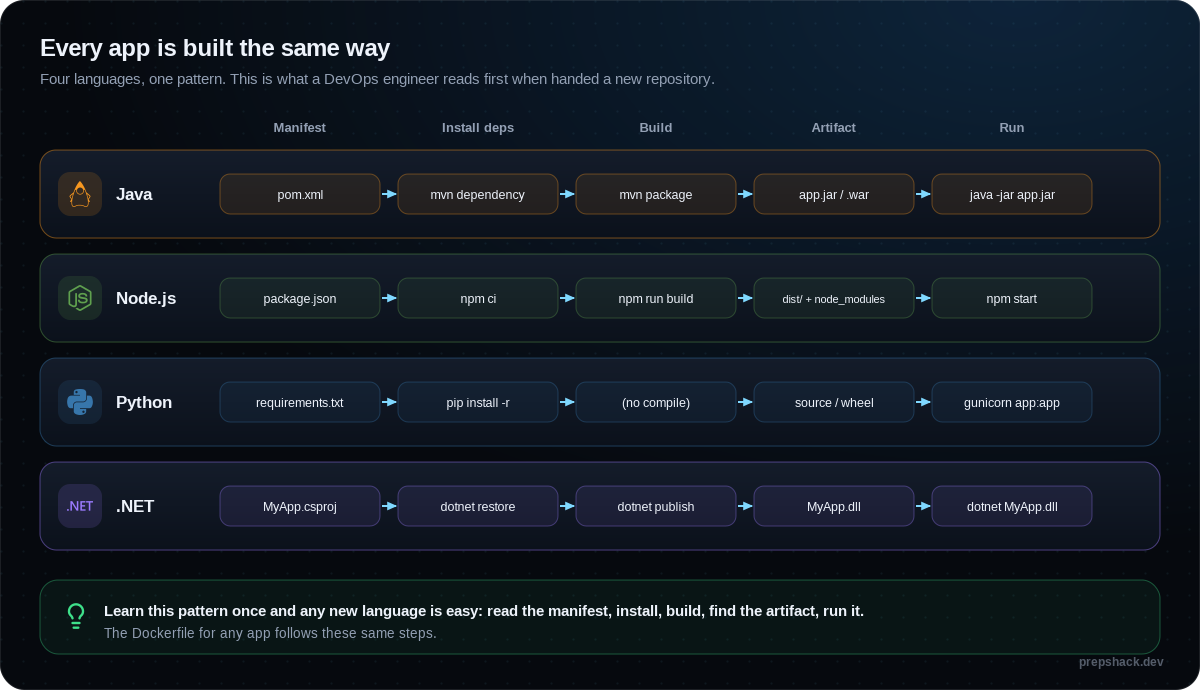
This lesson covers Java, the most common language in enterprise companies. The next lessons cover Node.js, Python and .NET. Once you see the pattern, any new language takes minutes to figure out.
2. Java in 60 seconds
- You write code in
.javafiles. - The Java compiler (
javac) turns them into.classfiles (bytecode). - The JVM (Java Virtual Machine) runs the bytecode. That's why Java runs anywhere a JVM is installed.
- JDK = tools to build Java (compiler + JVM). JRE = just enough to run Java. Build images need the JDK; runtime images only need a JRE.
java -version      # e.g. openjdk 21.0.4 — which Java is installed
javac -version     # is the compiler (JDK) installed?
Version matters. If the project targets Java 17 and the server has Java 11, the app won't start (
UnsupportedClassVersionError). Always match the Java version the project expects.
Nobody runs javac by hand on real projects. A build tool does it — and downloads libraries, runs tests and packages everything. The two big ones are Maven and Gradle.
3. Maven and pom.xml
Maven is a build tool for Java. Its whole configuration lives in one file: pom.xml (Project Object Model). If you see a pom.xml in the repo root, it's a Maven project.
<project>
  <modelVersion>4.0.0</modelVersion>

  <!-- Who this project is: these three together are its unique "coordinates" -->
  <groupId>com.shop</groupId>
  <artifactId>orders</artifactId>
  <version>1.4.0</version>
  <packaging>jar</packaging>          <!-- jar or war -->

  <properties>
    <java.version>21</java.version>
  </properties>

  <dependencies>
    <dependency>
      <groupId>org.springframework.boot</groupId>
      <artifactId>spring-boot-starter-web</artifactId>
    </dependency>
    <dependency>
      <groupId>org.postgresql</groupId>
      <artifactId>postgresql</artifactId>
    </dependency>
    <dependency>
      <groupId>org.junit.jupiter</groupId>
      <artifactId>junit-jupiter</artifactId>
      <scope>test</scope>              <!-- only used when running tests -->
    </dependency>
  </dependencies>
</project>
What a DevOps engineer reads from this file:
- groupId / artifactId / version — the name and version of what gets built. The output file will be
orders-1.4.0.jar. - packaging — will it produce a JAR or a WAR? (Section 6.)
- java.version — which Java the build and runtime need.
- dependencies — the libraries the app uses. Maven downloads them automatically.
The standard folder layout
orders/
├── pom.xml
├── src/main/java/...          ← application code
├── src/main/resources/        ← application.yml, templates, static files
├── src/test/java/...          ← unit tests
└── target/                    ← build output (created by Maven, never committed)
4. Where dependencies come from
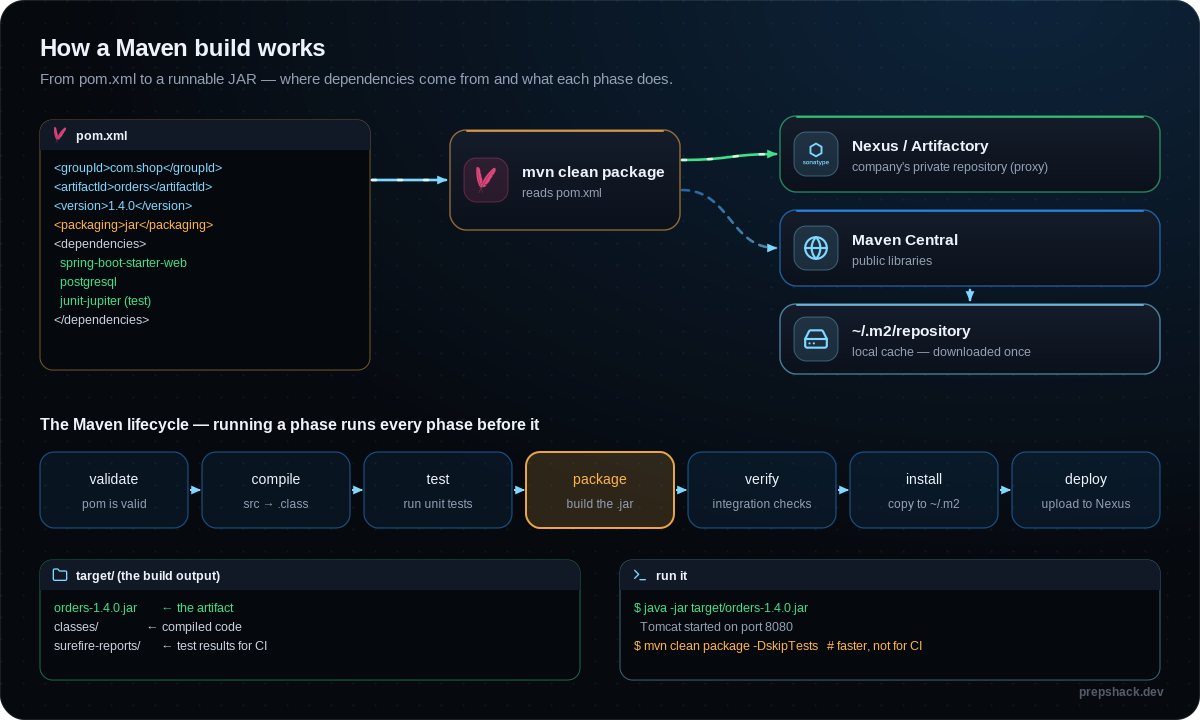
When you run a build, Maven reads the dependency list and downloads each library (a JAR file):
- First it checks your local cache,
~/.m2/repository. If the library is there, no download is needed. - Otherwise it downloads from a remote repository — by default Maven Central, the public library store.
- In companies, builds usually go through a private repository manager such as Nexus or JFrog Artifactory. It caches Maven Central (faster, works even if the internet is flaky) and stores the company's own internal libraries.
Maven is told about Nexus in ~/.m2/settings.xml:
<settings>
  <mirrors>
    <mirror>
      <id>nexus</id>
      <mirrorOf>*</mirrorOf>
      <url>https://nexus.company.com/repository/maven-public/</url>
    </mirror>
  </mirrors>
  <servers>
    <server>
      <id>nexus</id>
      <username>${env.NEXUS_USER}</username>
      <password>${env.NEXUS_PASS}</password>
    </server>
  </servers>
</settings>
Pipeline tip: cache
~/.m2/repositorybetween CI runs. Without the cache, every build downloads hundreds of megabytes again and takes minutes longer.
5. The Maven build lifecycle
Maven builds in phases, always in the same order. When you run a phase, Maven runs every phase before it too.
| Phase | What happens |
|---|---|
validate |
Checks the pom.xml is correct |
compile |
Compiles src/main/java into .class files |
test |
Runs unit tests from src/test/java |
package |
Bundles everything into a JAR or WAR in target/ |
verify |
Runs extra checks such as integration tests |
install |
Copies the artifact into your local ~/.m2 |
deploy |
Uploads the artifact to a remote repository (Nexus) |
The commands you'll use:
mvn clean package               # delete target/, then compile, test and package
mvn clean package -DskipTests   # skip tests — faster for local tries, never in real CI
mvn test                        # just compile and run tests
mvn clean deploy                # build and upload the artifact to Nexus
mvn -B -ntp clean verify        # good CI flags: batch mode, no download progress spam
clean isn't a lifecycle phase you need to remember in order — it simply deletes the target/ folder so you start fresh.
After mvn clean package:
target/
├── orders-1.4.0.jar         ← the artifact you deploy
├── classes/                 ← compiled code
└── surefire-reports/        ← test results (CI tools read these to show test reports)
If tests fail, the build stops and no JAR is produced. That's exactly what you want in a pipeline: broken code never becomes an artifact.
The Maven wrapper
Many projects include mvnw and a .mvn/ folder. That's the Maven wrapper: it downloads the exact Maven version the project expects. Use it instead of the system mvn:
./mvnw clean package
6. JAR vs WAR
This is one of the most asked Java questions in DevOps interviews.
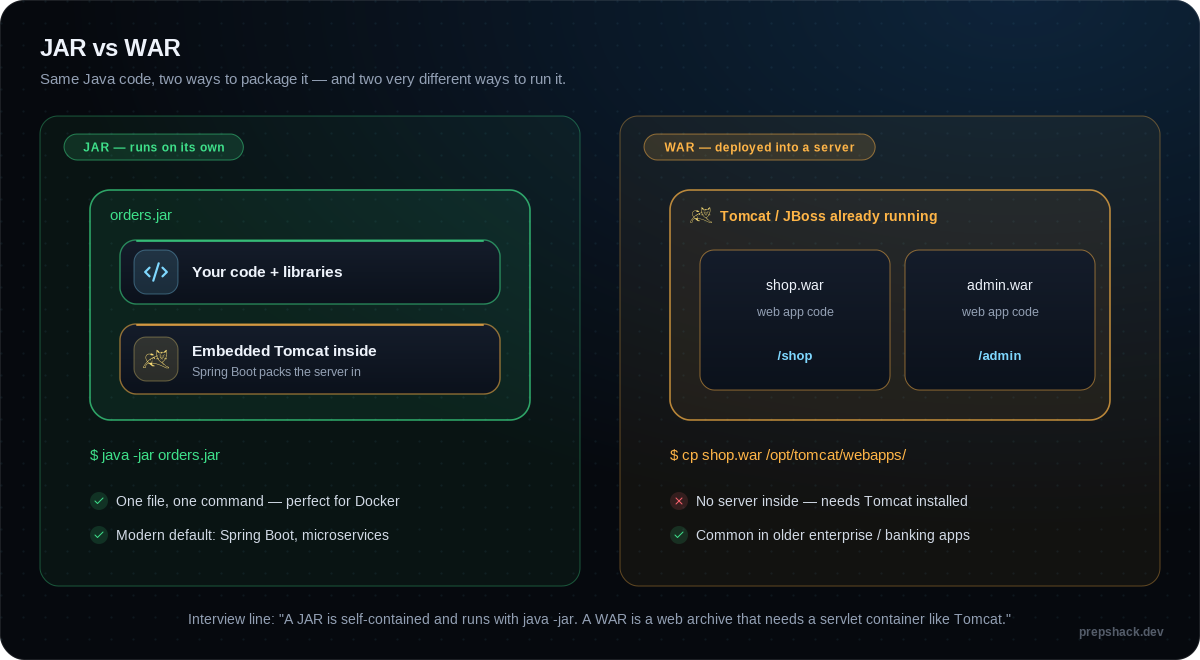
JAR (Java ARchive) — a zip file of compiled classes. A Spring Boot "fat JAR" contains your code, all libraries and an embedded web server (Tomcat). It runs on its own:
java -jar orders-1.4.0.jar
WAR (Web ARchive) — a web application without a server inside. It must be deployed into an already running server such as Apache Tomcat, JBoss/WildFly or WebLogic:
cp shop.war /opt/tomcat/webapps/ # Tomcat unpacks it and serves it at /shop
| JAR (Spring Boot) | WAR | |
|---|---|---|
| Server | Embedded inside | External (Tomcat, JBoss) |
| Run with | java -jar app.jar |
Copy into the server's webapps/ |
| Typical use | Microservices, containers | Older enterprise / banking apps |
| Docker image | FROM eclipse-temurin + the JAR |
FROM tomcat + the WAR |
7. Running a Java app properly
java -jar orders-1.4.0.jar                                 # default settings
java -jar orders-1.4.0.jar --server.port=9090              # override a setting
java -Xms512m -Xmx1g -jar orders-1.4.0.jar                 # min and max heap memory
SPRING_PROFILES_ACTIVE=prod java -jar orders-1.4.0.jar     # choose the "prod" profile
-Xmxsets the maximum memory the JVM may use for objects. If the app needs more, it crashes withOutOfMemoryError. In containers, modern Java reads the container memory limit;-XX:MaxRAMPercentage=75is a common setting.- To keep the app running on a server, run it as a systemd service — or, more commonly today, in a container.
A systemd unit for a JAR
# /etc/systemd/system/orders.service
[Unit]
Description=Orders service
After=network.target

[Service]
User=orders
ExecStart=/usr/bin/java -Xmx1g -jar /opt/orders/orders.jar
Environment=SPRING_PROFILES_ACTIVE=prod
Restart=always

[Install]
WantedBy=multi-user.target
sudo systemctl daemon-reload && sudo systemctl enable --now orders
journalctl -u orders -f        # watch the logs
8. Spring Boot configuration
Most modern Java services are Spring Boot apps. Their settings live in src/main/resources/application.properties or application.yml:
server:
  port: 8080

spring:
  datasource:
    url: ${DB_URL:jdbc:postgresql://localhost:5432/orders}
    username: ${DB_USER:orders}
    password: ${DB_PASSWORD}

management:
  endpoints.web.exposure.include: health,info,prometheus
${DB_URL:default}means "use the environment variableDB_URL, or this default if it isn't set". This is how one JAR works in dev, staging and production.- Profiles:
application-prod.ymloverrides values whenSPRING_PROFILES_ACTIVE=prod. - Relaxed binding: any setting can come from an environment variable —
spring.datasource.urlbecomesSPRING_DATASOURCE_URL. That's how Kubernetes passes config to Spring Boot apps. - Actuator gives you
/actuator/healthfor load balancer and Kubernetes health checks, and/actuator/prometheusfor metrics.
9. Gradle in brief
Gradle is the other big Java build tool (also the standard for Android). Its config is code — build.gradle (Groovy) or build.gradle.kts (Kotlin):
plugins {
  id 'org.springframework.boot' version '3.3.0'
  id 'java'
}
group = 'com.shop'
version = '1.4.0'
java { toolchain { languageVersion = JavaLanguageVersion.of(21) } }

repositories { mavenCentral() }

dependencies {
  implementation 'org.springframework.boot:spring-boot-starter-web'
  testImplementation 'org.junit.jupiter:junit-jupiter'
}
./gradlew clean build        # compile, test and package — always use the wrapper
./gradlew bootJar            # build the Spring Boot JAR
ls build/libs/               # output goes to build/libs, not target/
| Maven | Gradle | |
|---|---|---|
| Config file | pom.xml (XML) |
build.gradle(.kts) (code) |
| Output folder | target/ |
build/libs/ |
| Build command | mvn clean package |
./gradlew clean build |
| Speed | Good | Faster (incremental builds, build cache) |
10. Putting it in a pipeline and a container
A CI job
# GitHub Actions
- uses: actions/setup-java@v4
  with: { distribution: temurin, java-version: '21', cache: maven }
- run: ./mvnw -B -ntp clean verify
- uses: actions/upload-artifact@v4
  with: { name: orders-jar, path: target/*.jar }
A multi-stage Dockerfile
# Stage 1: build with the full JDK + Maven
FROM maven:3.9-eclipse-temurin-21 AS build
WORKDIR /src
COPY pom.xml .
RUN mvn -B -ntp dependency:go-offline     # cache dependencies in their own layer
COPY src ./src
RUN mvn -B -ntp clean package -DskipTests # tests already ran in CI

# Stage 2: run with only a small JRE
FROM eclipse-temurin:21-jre
WORKDIR /app
COPY --from=build /src/target/*.jar app.jar
USER 1001
EXPOSE 8080
ENTRYPOINT ["java", "-XX:MaxRAMPercentage=75", "-jar", "app.jar"]
Copying pom.xml and downloading dependencies before copying the source means Docker can reuse the dependency layer when only code changes — builds go from minutes to seconds.
11. Common build failures and what they mean
| Error | Likely cause | Fix |
|---|---|---|
Could not resolve dependencies |
Nexus down, wrong settings.xml, no internet |
Check repository URL and credentials |
Tests run: 120, Failures: 2 |
Code broke a test | Read target/surefire-reports, fix code |
invalid target release: 21 |
Build uses an older JDK | Install/select the right JDK |
UnsupportedClassVersionError at runtime |
Runtime Java older than build Java | Match runtime to build version |
Port 8080 already in use |
Another process on that port | ss -tlpn | grep 8080, stop it or change port |
OutOfMemoryError: Java heap space |
Heap too small or a memory leak | Raise -Xmx / container limit, check for leaks |
12. Key terms at a glance
| Term | Meaning in one line |
|---|---|
| JDK / JRE / JVM | Build tools / runtime only / the engine that runs bytecode |
| Maven | Java build tool configured by pom.xml |
| Gradle | Java build tool configured by build.gradle |
| Artifact | The built file you deploy — a JAR or WAR |
| Dependency | A library your code uses, downloaded by the build tool |
~/.m2 |
Maven's local dependency cache |
| Nexus / Artifactory | Private repository for libraries and artifacts |
| Lifecycle phase | A build step: compile, test, package, install, deploy |
| JAR | Self-contained archive, runs with java -jar |
| WAR | Web archive deployed into Tomcat or similar |
| Spring Boot | Popular Java framework with an embedded server |
| Profile | A named set of settings, e.g. prod |