1. Why networking matters for DevOps
Networking is how computers find each other and send data to each other. Every "the app is down" ticket eventually becomes a networking question: can A reach B, on which port, through which firewall, with which certificate?
As a DevOps engineer you will:
- Design cloud networks — VPCs, subnets, route tables, NAT gateways.
- Open the right ports in security groups and firewalls, and nothing more.
- Set up DNS records, load balancers and TLS certificates for every app.
- Debug things like "pods can't reach the database" or "the site works for me but not for customers".
You don't need to be a network engineer. You do need a clear mental model and the right debugging commands. That's what this lesson gives you.
2. What happens when you open a URL
This is one of the most asked interview questions, because it touches every layer. Let's follow https://shop.example.com from the browser to the database and back.
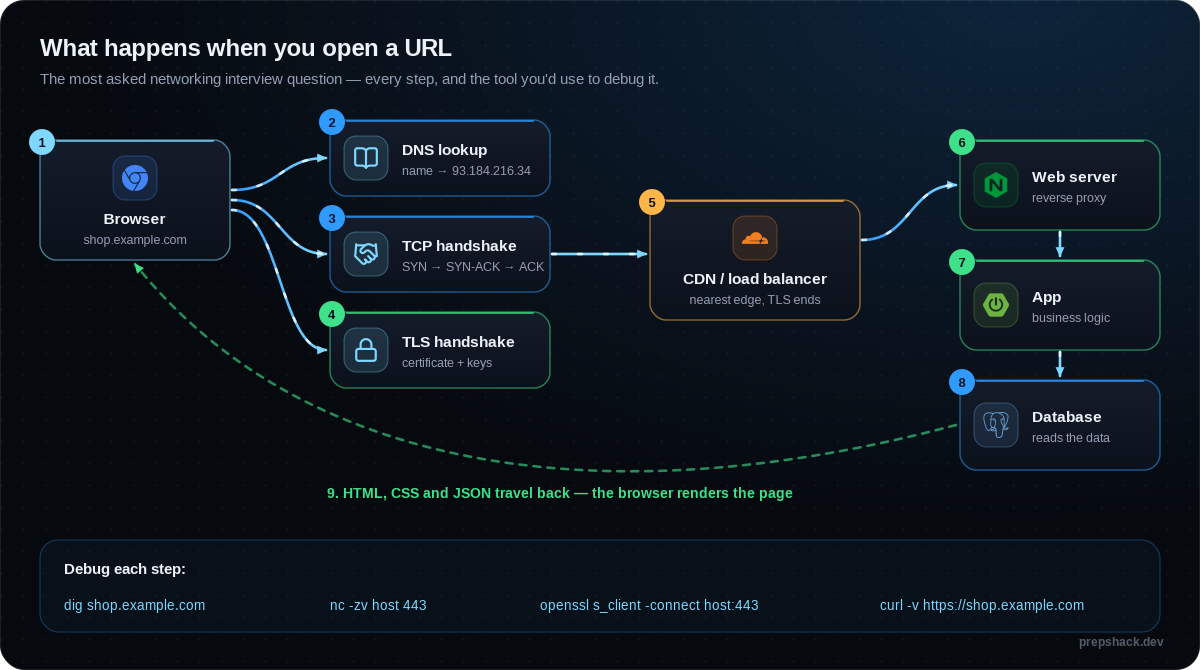
- You type the URL. The browser works out the scheme (
https), the host (shop.example.com) and the port (443 for HTTPS). - DNS lookup. The browser needs an IP address, so it asks DNS: "what is the IP of shop.example.com?" (section 6).
- TCP connection. The browser opens a connection to that IP on port 443 with a three-way handshake: SYN → SYN-ACK → ACK.
- TLS handshake. Browser and server agree on encryption, and the browser checks the server's certificate (section 7).
- The request reaches the edge. Usually a CDN or load balancer receives it first, often ending (terminating) TLS there.
- Reverse proxy. Something like Nginx or a Kubernetes Ingress routes the request by its path —
/apito the API service,/to the web front end. - The application runs its code.
- The database is queried for the data.
- The response travels back the same way, and the browser renders the HTML, CSS and JavaScript.
Knowing this flow tells you where to look when something breaks:
dig shop.example.com                                  # step 2: does DNS resolve?
nc -zv shop.example.com 443                           # step 3: is the port open?
openssl s_client -connect shop.example.com:443        # step 4: is the certificate valid?
curl -v https://shop.example.com/health               # steps 3–9: the whole request, verbose
3. Layers: the TCP/IP and OSI models
Networking is split into layers. Each layer has one job and doesn't care how the others do theirs. The practical model is TCP/IP with 4 layers. The OSI model has 7 layers and is what interviewers often name ("that's a layer 7 load balancer").
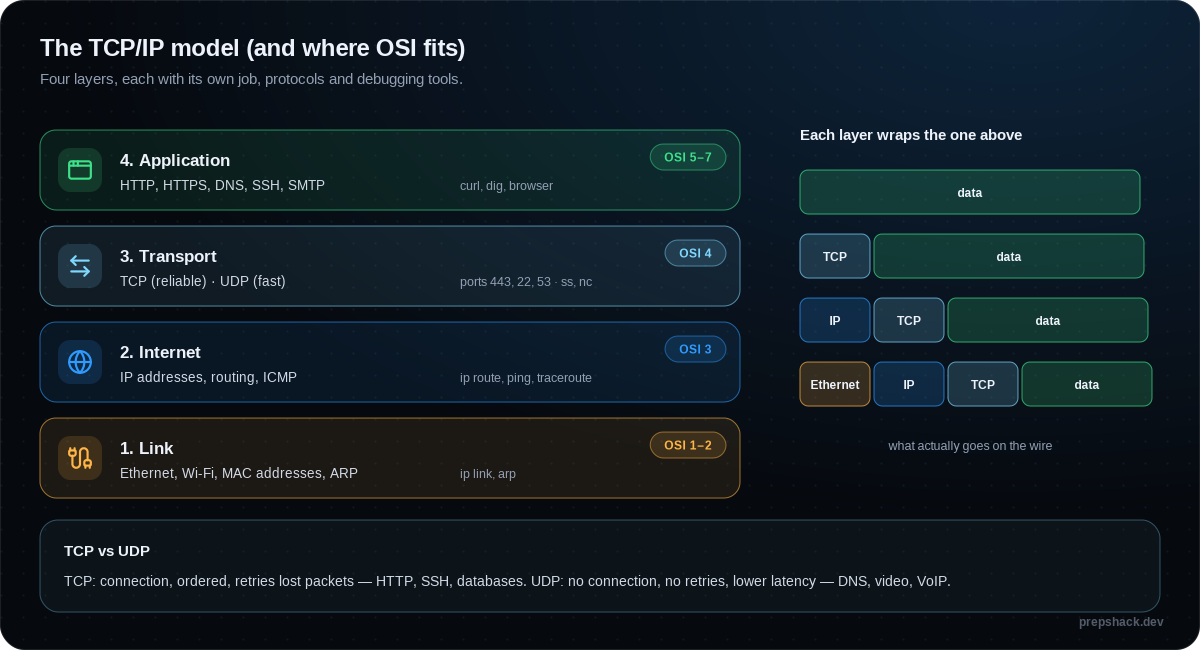
| TCP/IP layer | OSI layers | Job | Examples |
|---|---|---|---|
| Application | 5, 6, 7 | What the data means | HTTP, HTTPS, DNS, SSH, SMTP |
| Transport | 4 | Which program, and reliability | TCP, UDP, ports |
| Internet | 3 | Which computer, and the route | IP addresses, routing, ICMP (ping) |
| Link | 1, 2 | The local network hop | Ethernet, Wi-Fi, MAC addresses, ARP |
Why this matters: when someone says a Layer 4 load balancer, they mean it routes by IP and port only (fast, can't see URLs). A Layer 7 load balancer understands HTTP, so it can route by path, host name or headers.
4. IP addresses, ports, TCP and UDP
IP addresses
An IP address identifies a machine on a network. IPv4 looks like 192.168.1.10 — four numbers from 0 to 255.
Private ranges — used inside companies and cloud VPCs, not reachable from the internet:
10.0.0.0/8172.16.0.0/12192.168.0.0/16
Everything else is public. Special ones: 127.0.0.1 is localhost (this machine) and 0.0.0.0 means "all interfaces" when a server listens on it.
Ports
An IP gets you to the machine; a port gets you to the right program on it. Think of the IP as a building's address and the port as the flat number.
| Port | Service | Port | Service |
|---|---|---|---|
| 22 | SSH | 3306 | MySQL |
| 53 | DNS | 5432 | PostgreSQL |
| 80 | HTTP | 6379 | Redis |
| 443 | HTTPS | 27017 | MongoDB |
| 8080 | Common app port | 6443 | Kubernetes API |
TCP vs UDP
- TCP — makes a connection first (the handshake), guarantees data arrives complete and in order, and resends anything lost. Used by HTTP, SSH and databases.
- UDP — just sends packets with no connection and no retries. Faster with less overhead. Used by DNS lookups, video calls, streaming and gaming.
ss -tulpn                  # which ports are listening on this machine, and which program owns each
ss -tn state established   # current TCP connections
A very common bug: the app listens on
127.0.0.1:8080, so it only accepts connections from the same machine. In a container it must listen on0.0.0.0:8080to be reachable.
5. CIDR, subnetting and routing
CIDR notation
10.0.0.0/16 means: the first 16 bits of the address are fixed (the network part), and the remaining bits are free for hosts. The smaller the number after the slash, the bigger the network.
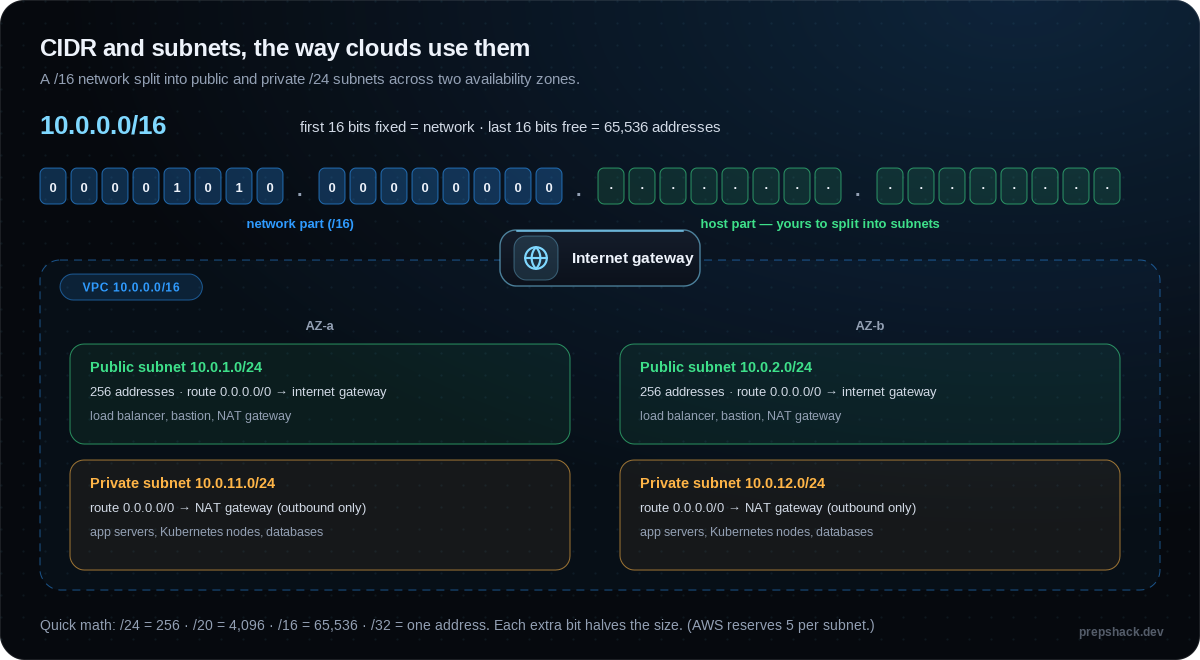
| CIDR | Addresses | Typical use |
|---|---|---|
| /16 | 65,536 | A whole VPC |
| /20 | 4,096 | A large subnet (e.g. for Kubernetes pods) |
| /24 | 256 | A normal subnet |
| /28 | 16 | A tiny subnet |
| /32 | 1 | Exactly one IP (common in firewall rules) |
The trick: every bit you add to the prefix halves the size. /24 → 256, /25 → 128, /26 → 64.
In AWS, 5 addresses in every subnet are reserved, so a /24 gives you 251 usable IPs. Azure also reserves 5.
Public and private subnets
This is the standard cloud design you'll build again and again:
- Public subnet — its route table sends
0.0.0.0/0(all internet traffic) to an internet gateway. Load balancers and bastion hosts live here. - Private subnet — no direct internet route. App servers, Kubernetes nodes and databases live here. For outbound access (to download updates or pull images) it routes through a NAT gateway.
- Use at least two availability zones so one data centre failure doesn't take you down.
Routing
A route table is a list of rules: "to reach this network, send packets there". The most specific match wins.
ip addr          # my IP addresses
ip route         # my route table — "default via 10.0.1.1" is the gateway
traceroute google.com   # every hop between me and Google
6. DNS: turning names into IP addresses
DNS (Domain Name System) is the internet's phone book. People remember names; computers need IP addresses. DNS translates one into the other.
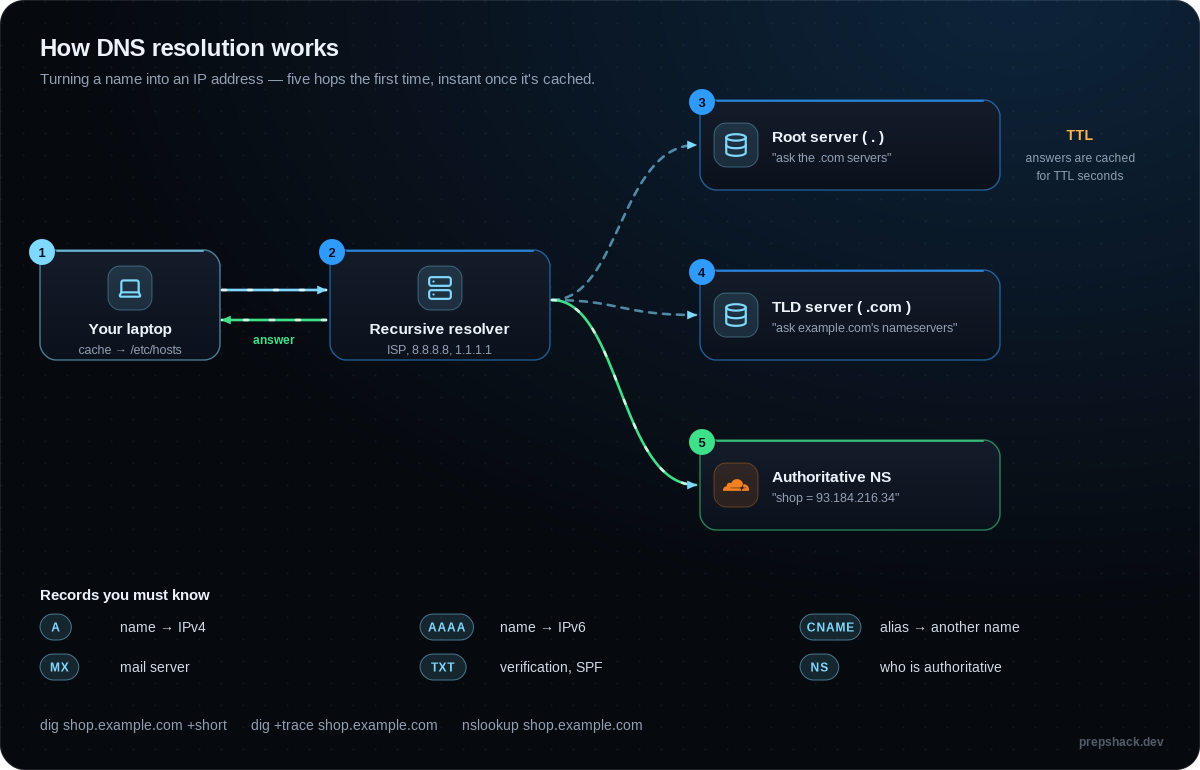
How a lookup works the first time:
- Your laptop checks its own cache and
/etc/hosts. - It asks a recursive resolver (your ISP's, or a public one like
8.8.8.8or1.1.1.1). - The resolver asks a root server, which says "ask the
.comservers". - The TLD server for
.comsays "ask example.com's nameservers". - The authoritative nameserver (Route 53, Azure DNS, Cloudflare…) gives the real answer.
Every answer has a TTL (time to live) — how many seconds it may be cached. Next time, the answer comes straight from cache.
Record types
| Record | What it does | Example |
|---|---|---|
| A | Name → IPv4 address | shop.example.com → 93.184.216.34 |
| AAAA | Name → IPv6 address | |
| CNAME | Alias to another name | www → shop.example.com |
| MX | Mail server for the domain | |
| TXT | Free text — domain verification, SPF | |
| NS | Which servers are authoritative |
Practical tip: before a migration, lower the TTL (for example to 60 seconds) a day in advance. Then when you switch the record, everyone picks up the change within a minute instead of hours.
dig shop.example.com +short          # just the answer
dig shop.example.com CNAME           # a specific record type
dig +trace shop.example.com          # see every step of the lookup
dig @8.8.8.8 shop.example.com        # ask a specific resolver
In Kubernetes, DNS is handled by CoreDNS: a service called orders in namespace shop is reachable at orders.shop.svc.cluster.local.
7. HTTP, HTTPS and TLS
HTTP basics
HTTP is the language of the web: a client sends a request, the server sends back a response.
GET /api/orders/42 HTTP/1.1
Host: shop.example.com
Authorization: Bearer eyJhbGci...
- Methods:
GET(read),POST(create),PUT/PATCH(update),DELETE. - Status codes:
2xxsuccess (200 OK, 201 Created) ·3xxredirect (301, 302) ·4xxthe client's fault (400 bad request, 401 not logged in, 403 not allowed, 404 not found) ·5xxthe server's fault (500 error, 502 bad gateway, 503 unavailable, 504 gateway timeout).
502 vs 504 comes up in real incidents: 502 means the proxy got a bad or no response from the app (it crashed or refused the connection). 504 means the proxy waited and the app was too slow.
HTTPS and TLS
HTTPS is HTTP inside an encrypted TLS connection. TLS does two things: it encrypts the data so nobody in the middle can read it, and it proves the server's identity with a certificate.
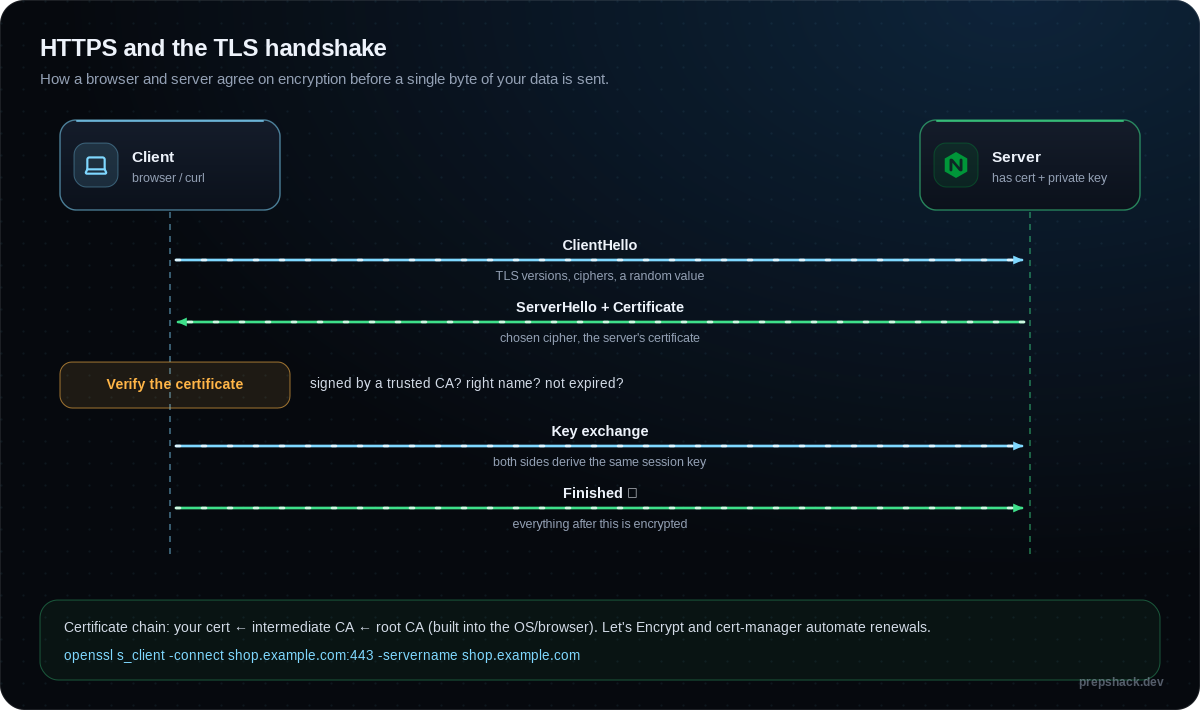
- A certificate contains the domain name, a public key, an expiry date and a signature from a Certificate Authority (CA).
- The browser trusts the certificate if it chains back to a root CA already built into the operating system.
- Let's Encrypt gives free certificates; cert-manager renews them automatically in Kubernetes; AWS ACM does it for AWS load balancers.
openssl s_client -connect shop.example.com:443 -servername shop.example.com </dev/null \
  | openssl x509 -noout -subject -issuer -dates      # who issued it, and when it expires
curl -vI https://shop.example.com                     # see the TLS details and headers
Expired certificates cause real outages every year. Monitor expiry dates and automate renewal.
8. Load balancers and reverse proxies
A load balancer spreads incoming traffic across several servers, so no single server is overloaded and one failure doesn't take the app down. It runs health checks and stops sending traffic to servers that fail them.
A reverse proxy sits in front of your apps and forwards requests to them. It can route by path or host name, terminate TLS, cache, compress and add security headers. Nginx, HAProxy, Envoy and Traefik are common ones. A Kubernetes Ingress controller is a reverse proxy.
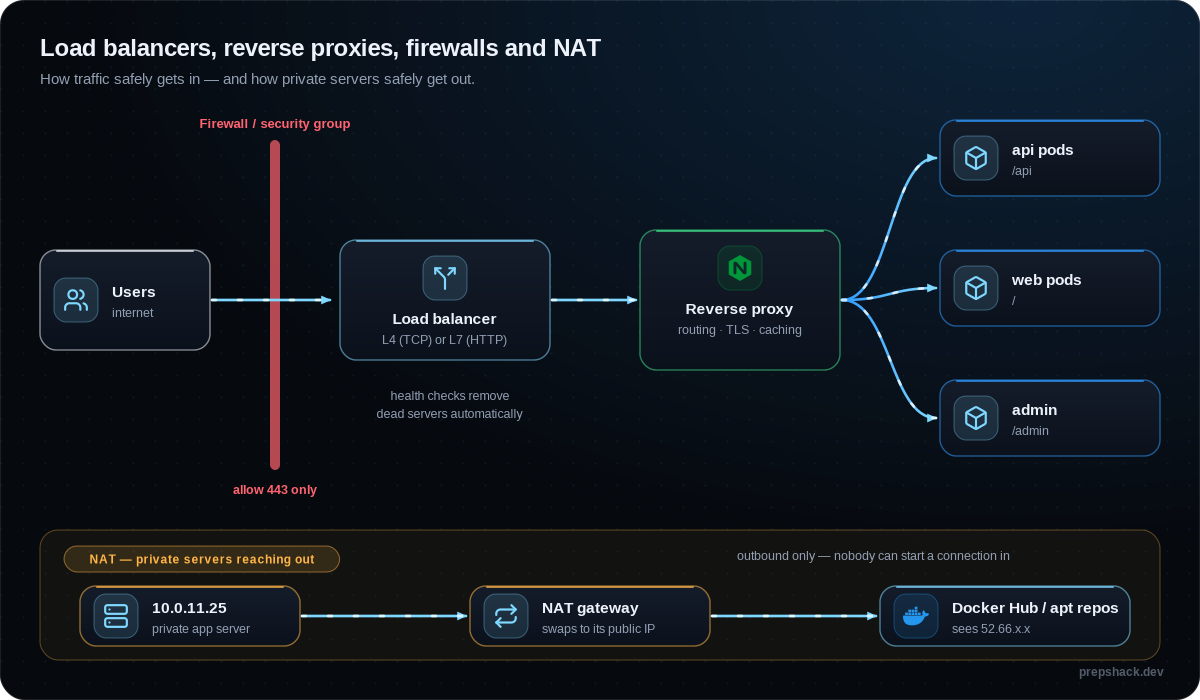
- Layer 4 (TCP) load balancing — AWS NLB, Azure Load Balancer. Very fast, routes by IP and port.
- Layer 7 (HTTP) load balancing — AWS ALB, Azure Application Gateway, Nginx. Can route
/apiand/adminto different services.
A simple Nginx reverse proxy:
server {
  listen 80;
  server_name shop.example.com;

  location /api/ {
    proxy_pass http://127.0.0.1:8080;
    proxy_set_header Host $host;
    proxy_set_header X-Forwarded-For $proxy_add_x_forwarded_for;
  }
  location / {
    root /var/www/shop;
  }
}
9. Firewalls, NAT and VPN
Firewalls and security groups
A firewall decides which traffic is allowed in and out, based on IP, port and protocol.
- AWS security groups are stateful: if you allow a request in, the reply is automatically allowed out. They have allow rules only.
- AWS network ACLs are stateless and apply to a whole subnet: you must allow both directions, and they can deny.
- Azure NSGs play the same role as security groups.
- On a Linux server:
ufw,firewalldoriptables/nftables.
The rule of thumb: allow only what's needed. The load balancer accepts 443 from anywhere; the app accepts 8080 only from the load balancer's security group; the database accepts 5432 only from the app's security group.
NAT
NAT (Network Address Translation) lets many private machines share one public IP. A NAT gateway lets servers in private subnets reach the internet (to pull images or install updates) while nobody on the internet can start a connection to them.
VPN
A VPN creates an encrypted tunnel over the internet, so two networks — or your laptop and the company network — behave as if they're directly connected. Site-to-site VPNs connect an office or data centre to a cloud VPC. Client VPNs connect individual engineers.
10. Debugging toolkit
A troubleshooting order that works for almost every "can't connect" problem:
# 1. Does the name resolve?
dig db.internal.example.com +short

# 2. Is the host reachable at all? (ICMP may be blocked, so don't trust ping alone)
ping -c 3 10.0.11.25

# 3. Is the port open from here?
nc -zv 10.0.11.25 5432          # "succeeded" = network path and firewall are fine

# 4. Is the service actually listening on the server?
ss -tulpn | grep 5432           # run on the server itself

# 5. Does the application respond correctly?
curl -v http://10.0.11.25:8080/health

# 6. Still stuck? Look at the packets.
sudo tcpdump -i any port 5432 -nn
A real scenario: "The app can't connect to the database — connection timed out."
digresolves fine → DNS is OK.nc -zv db 5432times out → something is blocking the path. (If it said connection refused instead, the network is fine but nothing is listening on that port.)- Check the database security group: it only allows 5432 from the old app subnet. Add the new app's security group, and the connection works.
Timed out vs refused is a great thing to say in an interview: timeout usually means a firewall is dropping packets; refused means you reached the machine but no program is listening on that port.
11. Extras worth knowing
- MTU — the largest packet size a link allows (usually 1500 bytes). VPNs and overlay networks add headers, and mismatched MTUs cause strange hangs where small requests work but large ones don't.
- IPv6 — 128-bit addresses like
2001:db8::1. There are so many that NAT is rarely needed. Clouds support dual-stack VPCs. - Anycast and BGP — the same IP is announced from many locations, and the internet's routing protocol (BGP) sends you to the nearest one. That's how CDNs and public DNS like
1.1.1.1are fast everywhere.
12. Key terms at a glance
| Term | Meaning in one line |
|---|---|
| IP address | Identifies a machine on a network |
| Port | Identifies a program on that machine |
| TCP / UDP | Reliable connection vs fast, connectionless packets |
| CIDR | Network size notation, e.g. 10.0.0.0/16 |
| Subnet | A smaller slice of a network |
| Route table | Rules for where to send traffic |
| DNS | Translates names into IP addresses |
| TTL | How long a DNS answer may be cached |
| TLS | Encryption and identity behind HTTPS |
| Certificate | Proves a server's identity, signed by a CA |
| Load balancer | Spreads traffic across healthy servers |
| Reverse proxy | Forwards requests to the right backend app |
| Security group | Stateful cloud firewall around a resource |
| NAT gateway | Lets private servers reach out to the internet |
| VPN | Encrypted tunnel between networks |