1. .NET in the DevOps world
.NET is Microsoft's platform for building apps in C#. Modern .NET (6, 8 and newer) is open source and runs on Linux, so .NET APIs run happily in Docker containers, on Kubernetes (AKS, EKS) and on Azure App Service. You'll meet it a lot in banks, insurance companies and any team that uses Azure heavily.
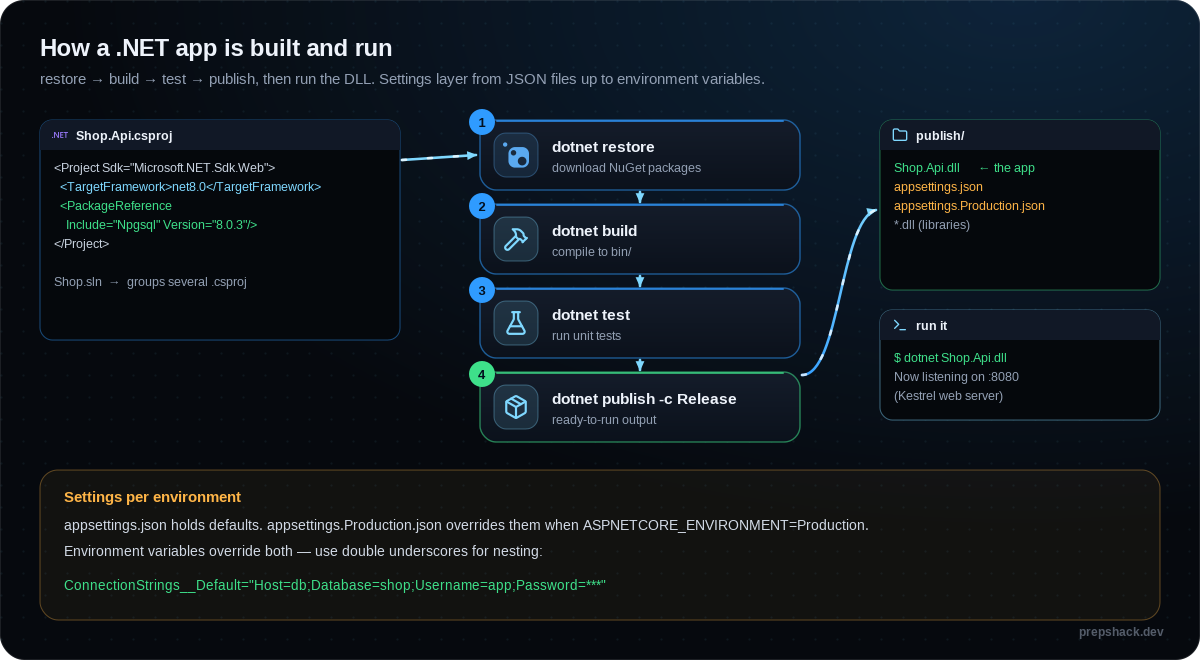
Everything is done with one command-line tool: dotnet.
dotnet --version          # 8.0.403 — the SDK version
dotnet --list-sdks        # all installed SDKs
dotnet --list-runtimes    # runtimes that can run apps
- The SDK contains the compiler and build tools. Build agents and build images need it.
- The runtime (for web apps, the ASP.NET Core runtime) is all you need to run a built app. Production images only need the runtime.
.NET Framework vs .NET: the old ".NET Framework 4.x" is Windows-only and runs on IIS. Modern ".NET" (formerly .NET Core) is cross-platform. If you see
net8.0in the project file, it's modern .NET and runs on Linux.
2. Project files: .csproj and .sln
A .csproj file describes one project — which .NET version it targets and which packages it uses.
<Project Sdk="Microsoft.NET.Sdk.Web">
  <PropertyGroup>
    <TargetFramework>net8.0</TargetFramework>
    <Nullable>enable</Nullable>
    <AssemblyName>Shop.Api</AssemblyName>
  </PropertyGroup>

  <ItemGroup>
    <PackageReference Include="Npgsql.EntityFrameworkCore.PostgreSQL" Version="8.0.4" />
    <PackageReference Include="Serilog.AspNetCore" Version="8.0.1" />
  </ItemGroup>
</Project>
Sdk="Microsoft.NET.Sdk.Web"— this is a web app (API or website). A plainMicrosoft.NET.Sdkis a library or console app.TargetFramework— the .NET version. Your build and runtime images must match it (net8.0→sdk:8.0andaspnet:8.0images).PackageReference— libraries from NuGet.
A .sln (solution) file groups several projects — for example the API, a class library and a test project:
Shop.sln
├── src/Shop.Api/Shop.Api.csproj
├── src/Shop.Domain/Shop.Domain.csproj
└── tests/Shop.Api.Tests/Shop.Api.Tests.csproj
Running dotnet build Shop.sln builds all of them in the right order.
3. NuGet packages
NuGet is .NET's package manager — the equivalent of Maven Central for Java or npm for Node.
dotnet add package Serilog.AspNetCore     # add a package (updates the .csproj)
dotnet list package --vulnerable          # check for packages with known CVEs
dotnet list package --outdated
- Public packages come from nuget.org.
- Companies often use a private feed — Azure Artifacts, Nexus or Artifactory — configured in a
nuget.configfile in the repo. - Downloaded packages are cached in
~/.nuget/packages. Cache this folder in CI to speed up builds.
4. The build commands: restore, build, test, publish
These four commands are the whole .NET build. You'll put exactly these in every pipeline.
dotnet restore                                  # 1. download NuGet packages
dotnet build -c Release --no-restore            # 2. compile (output in bin/Release/)
dotnet test -c Release --no-build               # 3. run unit tests
dotnet publish src/Shop.Api -c Release -o ./publish --no-build   # 4. create the deployable output
| Command | What it does | Output |
|---|---|---|
restore |
Downloads every package in the .csproj files | obj/, ~/.nuget/packages |
build |
Compiles code into DLLs | bin/Release/net8.0/ |
test |
Builds and runs test projects (xUnit, NUnit, MSTest) | Test results (--logger trx) |
publish |
Collects the app and everything it needs to run | A folder ready to deploy |
-c Releasebuilds an optimised Release version. The default isDebug— never deploy Debug builds.--no-restore/--no-buildskip steps that already ran, which saves time in pipelines.
The publish output
publish/
├── Shop.Api.dll                      ← your app
├── Shop.Domain.dll
├── Serilog.dll, Npgsql.dll ...       ← libraries
├── appsettings.json
├── appsettings.Production.json
└── web.config                        (only used by IIS on Windows)
5. Running the app
dotnet publish/Shop.Api.dll
# info: Microsoft.Hosting.Lifetime[14]
#       Now listening on: http://[::]:8080
ASP.NET Core apps include their own fast web server called Kestrel — no IIS or Apache needed on Linux.
ASPNETCORE_URLS=http://0.0.0.0:5000 dotnet Shop.Api.dll     # choose the port
ASPNETCORE_ENVIRONMENT=Production dotnet Shop.Api.dll        # choose the environment
Since .NET 8, the official container images listen on port 8080 by default (earlier versions used 80). If a migrated app suddenly isn't reachable, check this.
6. appsettings.json and environments
Settings are layered. Each layer overrides the one before it:
appsettings.json— defaults for every environment.appsettings.{Environment}.json— for exampleappsettings.Production.json, chosen byASPNETCORE_ENVIRONMENT.- Environment variables — override everything above.
- Command-line arguments.
{
  "ConnectionStrings": {
    "Default": "Host=localhost;Database=shop;Username=shop;Password=dev-only"
  },
  "Logging": { "LogLevel": { "Default": "Information" } },
  "Payments": { "ApiUrl": "https://sandbox.pay.example.com" }
}
To override a nested setting with an environment variable, join the levels with double underscores:
export ConnectionStrings__Default="Host=db.prod;Database=shop;Username=shop_app;Password=***"
export Payments__ApiUrl="https://pay.example.com"
In Kubernetes, these go into the Deployment's env: section, with passwords coming from a Secret. On Azure App Service, they're "Application settings". The password never lives in a committed appsettings.Production.json.
7. Self-contained vs framework-dependent
dotnet publish can produce two kinds of output:
| Framework-dependent (default) | Self-contained | |
|---|---|---|
| Needs .NET installed on the server? | Yes | No — the runtime is bundled in |
| Size | Small (a few MB) | Large (70 MB+) |
| Run with | dotnet Shop.Api.dll |
./Shop.Api (native executable) |
| Command | dotnet publish -c Release |
dotnet publish -c Release -r linux-x64 --self-contained |
In containers, framework-dependent is the norm: the base image (mcr.microsoft.com/dotnet/aspnet:8.0) already contains the runtime.
8. Pipeline and Docker
Azure DevOps pipeline steps
steps:
- task: UseDotNet@2
  inputs: { version: '8.0.x' }
- script: dotnet restore
- script: dotnet build -c Release --no-restore
- script: dotnet test -c Release --no-build --logger trx
- script: dotnet publish src/Shop.Api -c Release -o $(Build.ArtifactStagingDirectory) --no-build
- publish: $(Build.ArtifactStagingDirectory)
  artifact: shop-api
Multi-stage Dockerfile
FROM mcr.microsoft.com/dotnet/sdk:8.0 AS build
WORKDIR /src
COPY *.sln .
COPY src/Shop.Api/*.csproj src/Shop.Api/
COPY src/Shop.Domain/*.csproj src/Shop.Domain/
RUN dotnet restore src/Shop.Api/Shop.Api.csproj        # cached unless project files change
COPY . .
RUN dotnet publish src/Shop.Api -c Release -o /app --no-restore

FROM mcr.microsoft.com/dotnet/aspnet:8.0
WORKDIR /app
COPY --from=build /app .
USER app
EXPOSE 8080
ENTRYPOINT ["dotnet", "Shop.Api.dll"]
The SDK image is ~800 MB; the final ASP.NET runtime image is ~220 MB (and Alpine or "chiseled" variants are much smaller).
9. Common problems
| Problem | Cause | Fix |
|---|---|---|
NU1101: Unable to find package |
Private feed not configured or no access | Add the feed in nuget.config with credentials |
The framework 'Microsoft.AspNetCore.App' 8.0 was not found |
Runtime missing or wrong version | Use the matching aspnet image / install the runtime |
| App runs but not reachable in container | Listening on localhost or wrong port | Set ASPNETCORE_URLS=http://+:8080, expose 8080 |
| Wrong settings in production | ASPNETCORE_ENVIRONMENT not set |
Set it to Production |
| Deployed a slow Debug build | Forgot -c Release |
Always build and publish in Release |
10. Key terms at a glance
| Term | Meaning in one line |
|---|---|
| .NET SDK / runtime | Tools to build apps / what's needed to run them |
| C# | The main .NET programming language |
| .csproj | Project file: target framework and packages |
| .sln | Solution file grouping several projects |
| NuGet | .NET's package manager and repository |
dotnet restore |
Download packages |
dotnet publish |
Produce the deployable output folder |
| DLL | A compiled .NET assembly — your app is Shop.Api.dll |
| Kestrel | Built-in ASP.NET Core web server |
| appsettings.json | Configuration file, layered by environment |
ASPNETCORE_ENVIRONMENT |
Picks Development, Staging or Production settings |