1. Why this is a DevOps job
Almost every app talks to a database. Developers write the queries, but getting the app connected — safely, in every environment — is usually the DevOps engineer's job. You'll be the one who:
- Gives the app the right database address for dev, staging and production.
- Makes sure the password reaches the app without being written in code or Git.
- Opens the network path (security groups, firewall rules) between the app and the database.
- Debugs "the app can't connect to the database" at 2 a.m.
- Makes sure schema changes (migrations) run safely during deployments.
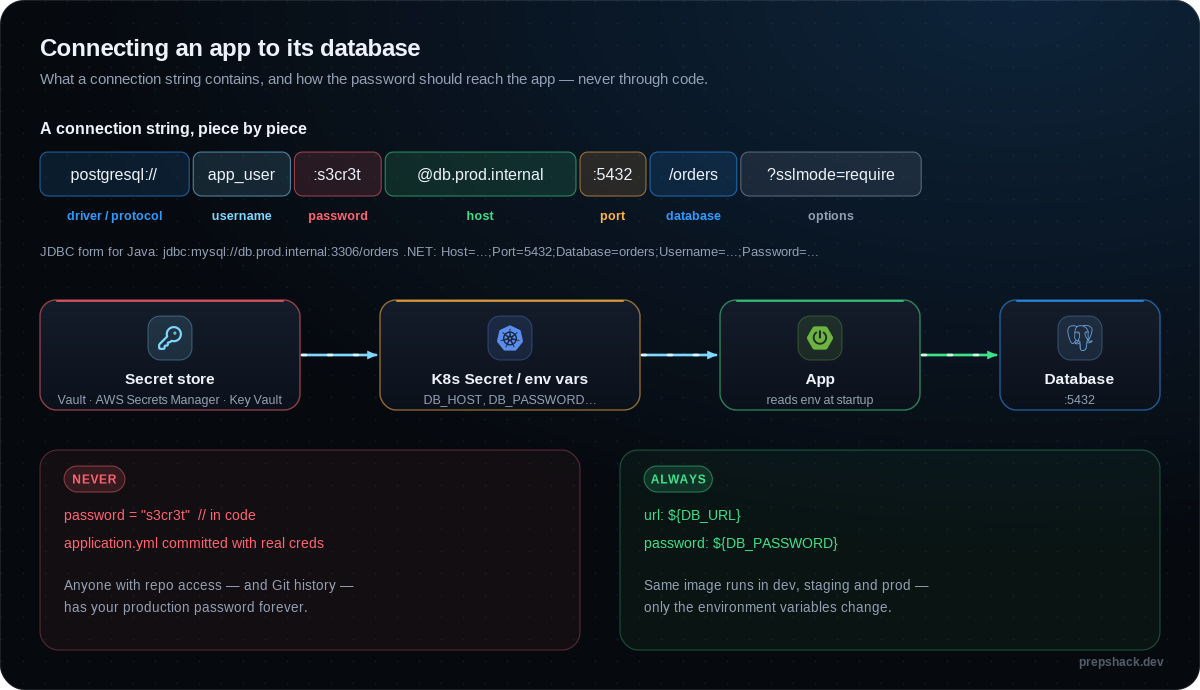
2. Connection strings
A connection string is one line of text that tells the app how to reach a database: which type of database, where it is, which database inside it, and how to log in.
postgresql://orders_app:[email protected]:5432/orders?sslmode=require
└──driver──┘ └──user───┘└pass┘ └──────host──────┘└port┘└─db─┘└──options───┘
The same information looks different in each language:
| Stack | Example |
|---|---|
| Java (JDBC) | jdbc:postgresql://db.prod.internal:5432/orders (user and password are separate settings) |
| Java + MySQL | jdbc:mysql://db.prod.internal:3306/orders?useSSL=true |
| Node.js / Python | postgresql://user:pass@host:5432/orders |
| .NET | Host=db.prod.internal;Port=5432;Database=orders;Username=orders_app;Password=*** |
| MongoDB | mongodb://user:pass@mongo1:27017,mongo2:27017/orders?replicaSet=rs0 |
Default ports to remember: MySQL 3306, PostgreSQL 5432, MongoDB 27017, SQL Server 1433, Redis 6379.
If the password contains special characters like
@,:or/, they must be URL-encoded in URL-style connection strings (@becomes%40). Unencoded special characters are a common cause of mysterious login failures.
3. Passing settings through environment variables
The golden rule: build the app once, then configure it per environment through environment variables. The same Docker image runs in dev, staging and production — only the variables change. (This is one of the "Twelve-Factor App" principles.)
How each stack reads them:
# Spring Boot — application.yml
spring:
  datasource:
    url: ${DB_URL}
    username: ${DB_USER}
    password: ${DB_PASSWORD}
// Node.js
const pool = new Pool({ connectionString: process.env.DATABASE_URL });
# Python
DATABASE_URL = os.environ["DATABASE_URL"]
# .NET — double underscore for nested settings
ConnectionStrings__Default="Host=...;Password=..."
Setting them in different places:
# Linux shell / systemd
export DB_URL="jdbc:postgresql://db:5432/orders"

# Docker
docker run -e DB_URL=... -e DB_PASSWORD=... shop-api:1.4.0
docker run --env-file prod.env shop-api:1.4.0
# Kubernetes Deployment
env:
  - name: DB_URL
    value: jdbc:postgresql://orders-db.data.svc.cluster.local:5432/orders
  - name: DB_PASSWORD
    valueFrom:
      secretKeyRef:
        name: orders-db
        key: password
4. Keeping passwords in secrets, not code
Passwords, API keys and tokens are secrets. They must never appear in source code, committed config files, Dockerfiles or pipeline YAML. Git keeps history forever — a password committed once and deleted later is still there for anyone with access.
Where secrets should live:
| Option | Where it's used |
|---|---|
| Kubernetes Secret | Mounted as env vars or files in pods (base64-encoded, so also enable encryption at rest) |
| HashiCorp Vault | Central secret store for any platform, with dynamic short-lived DB passwords |
| AWS Secrets Manager / SSM Parameter Store | AWS workloads (ECS, EKS, Lambda) |
| Azure Key Vault | Azure workloads (AKS, App Service, Functions) |
| CI secrets | GitHub Actions secrets, Jenkins credentials, GitLab CI variables |
A typical production flow: the password is stored in AWS Secrets Manager or Azure Key Vault → the External Secrets Operator copies it into a Kubernetes Secret → the pod reads it as an environment variable. No human ever copies the password by hand.
Even better: managed identities / IAM database authentication let the app log in to Azure SQL, RDS or Cloud SQL with its cloud identity, so there's no password to leak at all.
Interview tip: if asked "How do you manage database passwords?", walk through that exact chain — secret manager → Kubernetes Secret (via External Secrets) → env var — and mention rotation and least-privilege database users.
5. Checking connectivity
When the app says it can't connect, work through the layers in order. Run these from where the app runs — the app server, or inside the pod (kubectl exec -it <pod> -- sh).
# 1. Does the hostname resolve?
nslookup db.prod.internal
dig +short orders-db.data.svc.cluster.local

# 2. Is the port reachable? (network path + firewall/security group)
nc -zv db.prod.internal 5432
#   succeeded  → network is fine, look at credentials/database
#   timed out  → something is blocking: security group, NSG, NetworkPolicy, wrong subnet route
#   refused    → host reached, but nothing listening on that port (wrong port, DB down)

# 3. If nc isn't installed, bash can test TCP itself:
timeout 3 bash -c '</dev/tcp/db.prod.internal/5432' && echo open || echo closed

# 4. Can you actually log in with the client tool?
psql "postgresql://[email protected]:5432/orders" -c "select 1;"
mysql -h db.prod.internal -u orders_app -p -e "select 1;"
mongosh "mongodb://orders_app@mongo1:27017/orders" --eval "db.runCommand({ ping: 1 })"
Reading the errors
| Error message | What it usually means |
|---|---|
Connection timed out |
Firewall / security group / NetworkPolicy is dropping traffic |
Connection refused |
Wrong port, or the database isn't running/listening |
Unknown host / Name or service not known |
DNS problem or typo in the hostname |
password authentication failed / Access denied for user |
Wrong username/password, or user not allowed from this host |
database "orders" does not exist |
Connected fine, but wrong database name |
no pg_hba.conf entry for host |
PostgreSQL isn't configured to accept this client IP |
too many connections |
Connection limit reached — see pooling below |
SSL required / certificate errors |
Database requires TLS; set sslmode / useSSL correctly |
6. Database migrations
A migration is a versioned script that changes the database structure — create a table, add a column, add an index. Migrations live in Git next to the code, so the database schema is versioned just like the app.
db/migration/
├── V1__create_orders.sql
├── V2__add_status_to_orders.sql
└── V3__index_orders_customer_id.sql
The migration tool records which versions already ran in a special table, and applies only the new ones — in order, exactly once.
| Tool | Stack |
|---|---|
| Flyway | Java (also standalone CLI); plain SQL files V1__name.sql |
| Liquibase | Java and others; changelogs in SQL, XML or YAML; supports rollbacks |
| Alembic | Python (SQLAlchemy) |
| Django migrations | python manage.py migrate |
| EF Core migrations | .NET — dotnet ef database update |
| Prisma / Knex / Sequelize | Node.js |
How they run in deployments:
- At app startup — Spring Boot runs Flyway automatically. Simple, but with many replicas they all race to migrate (Flyway uses a lock to handle this).
- As a separate step — a Kubernetes Job, Helm pre-upgrade hook or pipeline stage runs migrations before the new app version rolls out. More control; common in larger teams.
Write backward-compatible migrations. During a rolling deploy, old and new app versions run at the same time against the same database. Add a column first, deploy code that uses it, and only remove old columns in a later release. Never rename or drop something the running version still needs.
7. Connection pooling
Opening a database connection is slow (TCP + TLS + authentication). A connection pool keeps a set of open connections and lends them to requests, then takes them back. Every serious app uses one:
- Java: HikariCP (Spring Boot's default) —
spring.datasource.hikari.maximum-pool-size=10 - Node:
pg.Pool; Python: SQLAlchemy's pool; .NET: built into the driver.
The maths that catches teams out: pods × pool size must stay below the database's max connections. 30 pods × 20 connections = 600, but a small PostgreSQL may allow only 100. When you scale out, you can suddenly exhaust the database. Tools like PgBouncer or RDS Proxy sit in between and share connections across many app instances.
8. Key terms at a glance
| Term | Meaning in one line |
|---|---|
| Connection string | One line with driver, host, port, database and credentials |
| JDBC URL | Java's connection string format: jdbc:postgresql://... |
| Environment variable | Setting passed to the app from outside the code |
| Secret | Sensitive value: password, key, token |
| Secret manager | Vault, AWS Secrets Manager, Azure Key Vault |
| External Secrets Operator | Syncs cloud secrets into Kubernetes Secrets |
| Migration | Versioned script that changes the database schema |
| Flyway / Liquibase / Alembic | Popular migration tools |
| Connection pool | Reused set of open DB connections |
| Least privilege | App user gets only the permissions it needs |