1. What PostgreSQL is
PostgreSQL ("Postgres") is a powerful open-source relational database. Like MySQL, it stores data in tables and uses SQL — but it's known for strict correctness, advanced features (JSON columns, full-text search, extensions like PostGIS and pgvector) and excellent performance on complex queries. It's the default choice for many new apps, and the database behind tools like SonarQube, Keycloak, GitLab and Backstage.
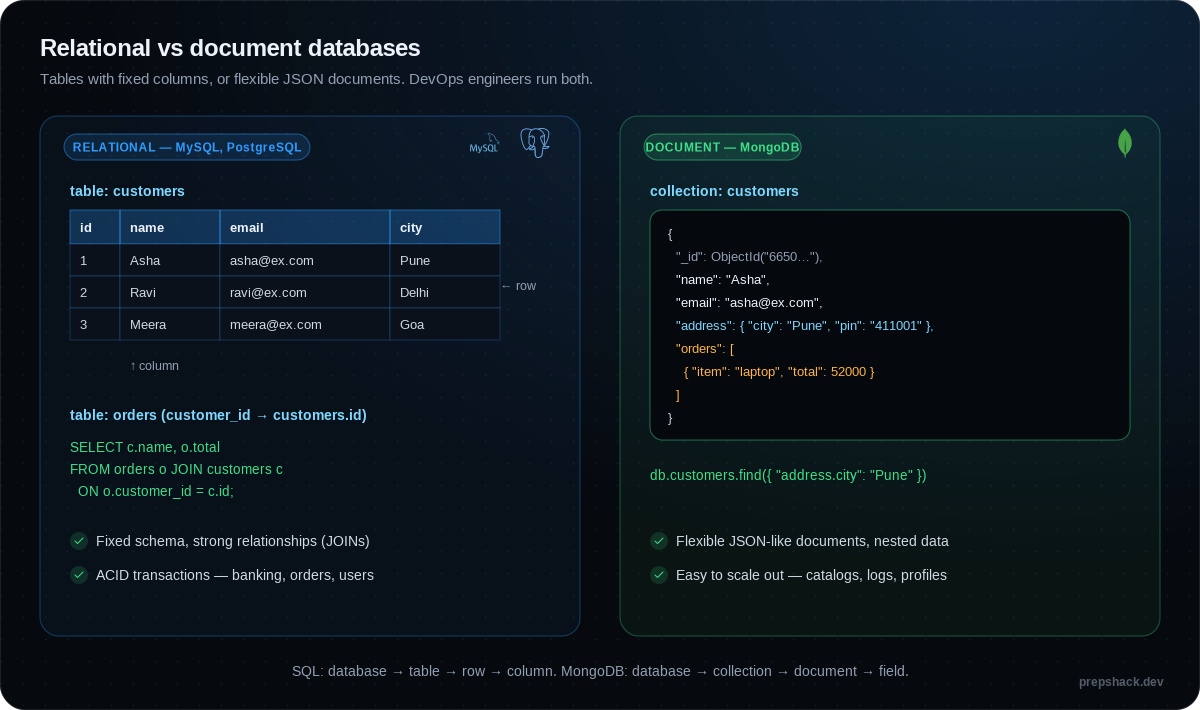
How Postgres is organised (one layer more than MySQL):
- A cluster / server — one running Postgres instance on port 5432.
- Databases —
shop,sonarqube… Each connection is to one database. - Schemas — folders inside a database. The default is
public. - Tables inside schemas.
- Roles — users and groups (in Postgres, a user is just a role that can log in).
2. Install and start PostgreSQL
Option A: on Ubuntu
sudo apt update
sudo apt install -y postgresql postgresql-contrib
sudo systemctl enable --now postgresql
sudo systemctl status postgresql
Two config files matter:
postgresql.conf— server settings. To accept remote connections:listen_addresses = '*'.pg_hba.conf— who may connect, from where, and how they authenticate. For example, to let the app subnet log in with a password:
# TYPE  DATABASE  USER       ADDRESS        METHOD
host    shop      shop_app   10.0.11.0/24   scram-sha-256
sudo systemctl reload postgresql # apply pg_hba.conf changes
Option B: in Docker
docker run -d --name postgres \
  -e POSTGRES_PASSWORD=rootpass \
  -e POSTGRES_DB=shop \
  -p 5432:5432 \
  -v pg-data:/var/lib/postgresql/data \
  postgres:16

docker exec -it postgres psql -U postgres
3. Log in with psql
sudo -u postgres psql                         # local admin, Ubuntu
psql -U postgres -h localhost                 # as user postgres
psql -h db.prod.internal -p 5432 -U shop_app -d shop     # remote: host, port, user, database
psql "postgresql://[email protected]:5432/shop?sslmode=require"
-Uuser,-ddatabase,-hhost,-pport.- For scripts, the password can come from the
PGPASSWORDenvironment variable or a~/.pgpassfile (permissions 600) — never on the command line.
4. Look around: the backslash commands
psql has short meta-commands that start with a backslash. These are the ones you'll use constantly:
| Command | What it shows |
|---|---|
\l |
List all databases |
\c shop |
Connect to (switch to) the shop database |
\dt |
List tables in the current database |
\d orders |
Describe a table: columns, types, indexes, foreign keys |
\dn |
List schemas |
\du |
List roles (users) and their attributes |
\conninfo |
Which database, user, host and port am I connected to? |
\x |
Toggle expanded (vertical) output for wide rows |
\i file.sql |
Run SQL from a file |
\q |
Quit |
SELECT version();
SELECT current_database(), current_user;
SELECT pid, usename, state, query FROM pg_stat_activity;   -- who's connected, what's running
5. Create databases, roles and permissions
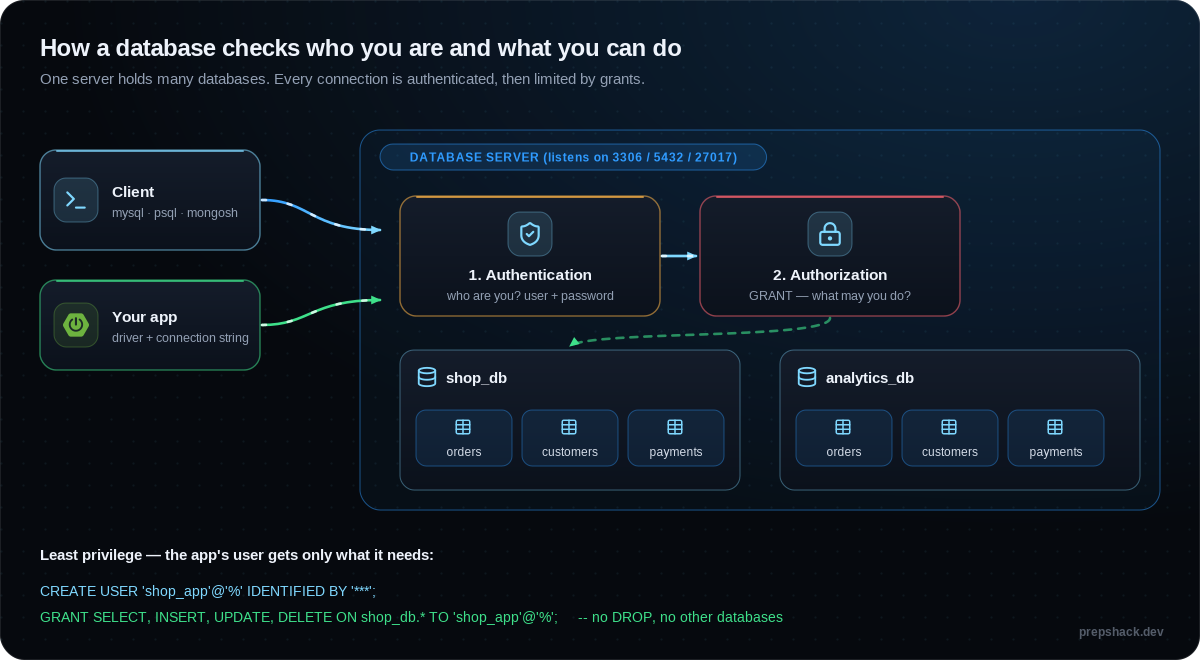
-- A login role for the app, and a database it owns
CREATE ROLE shop_app WITH LOGIN PASSWORD 'Str0ng-Pass!';
CREATE DATABASE shop OWNER shop_app;
When the app owns its database, it can create its own tables through migrations. For tighter control — for example a read-only reporting user — grant permissions explicitly:
\c shop
CREATE ROLE reporting WITH LOGIN PASSWORD 'R3ad-Only!';
GRANT CONNECT ON DATABASE shop TO reporting;
GRANT USAGE ON SCHEMA public TO reporting;
GRANT SELECT ON ALL TABLES IN SCHEMA public TO reporting;
ALTER DEFAULT PRIVILEGES IN SCHEMA public GRANT SELECT ON TABLES TO reporting;  -- future tables too
ALTER ROLE shop_app WITH PASSWORD 'N3w-Pass!';   -- rotate a password
\du                                              -- check roles
DROP ROLE old_app;
Remember: logging in needs two things in Postgres — a role with
LOGINand a password, and a matching line inpg_hba.conf. The errorno pg_hba.conf entry for hostmeans the second one is missing.
6. Create tables and work with data
\c shop

CREATE TABLE customers (
  id         SERIAL PRIMARY KEY,               -- auto-incrementing integer
  name       VARCHAR(100) NOT NULL,
  email      VARCHAR(150) UNIQUE NOT NULL,
  city       VARCHAR(50),
  created_at TIMESTAMPTZ DEFAULT now()
);

CREATE TABLE orders (
  id          SERIAL PRIMARY KEY,
  customer_id INT NOT NULL REFERENCES customers(id),
  total       NUMERIC(10,2) NOT NULL,
  status      TEXT DEFAULT 'NEW',
  details     JSONB                             -- Postgres can store JSON natively
);
-- Insert (RETURNING gives you back the new row's id)
INSERT INTO customers (name, email, city) VALUES ('Asha', '[email protected]', 'Pune') RETURNING id;
INSERT INTO orders (customer_id, total, details)
VALUES (1, 52000, '{"item": "laptop", "gift": true}');

-- Select
SELECT * FROM customers WHERE city = 'Pune';
SELECT c.name, o.total FROM orders o JOIN customers c ON c.id = o.customer_id;
SELECT details->>'item' AS item FROM orders WHERE details->>'gift' = 'true';

-- Update and delete — always with WHERE, ideally inside a transaction
BEGIN;
UPDATE orders SET status = 'SHIPPED' WHERE id = 1;
-- check the result, then:
COMMIT;      -- or ROLLBACK; to undo

DELETE FROM orders WHERE status = 'CANCELLED';
Useful size checks during incidents:
SELECT pg_size_pretty(pg_database_size('shop'));
SELECT relname, pg_size_pretty(pg_total_relation_size(relid))
FROM pg_catalog.pg_statio_user_tables ORDER BY pg_total_relation_size(relid) DESC LIMIT 5;
7. Backup and restore: pg_dump and pg_restore
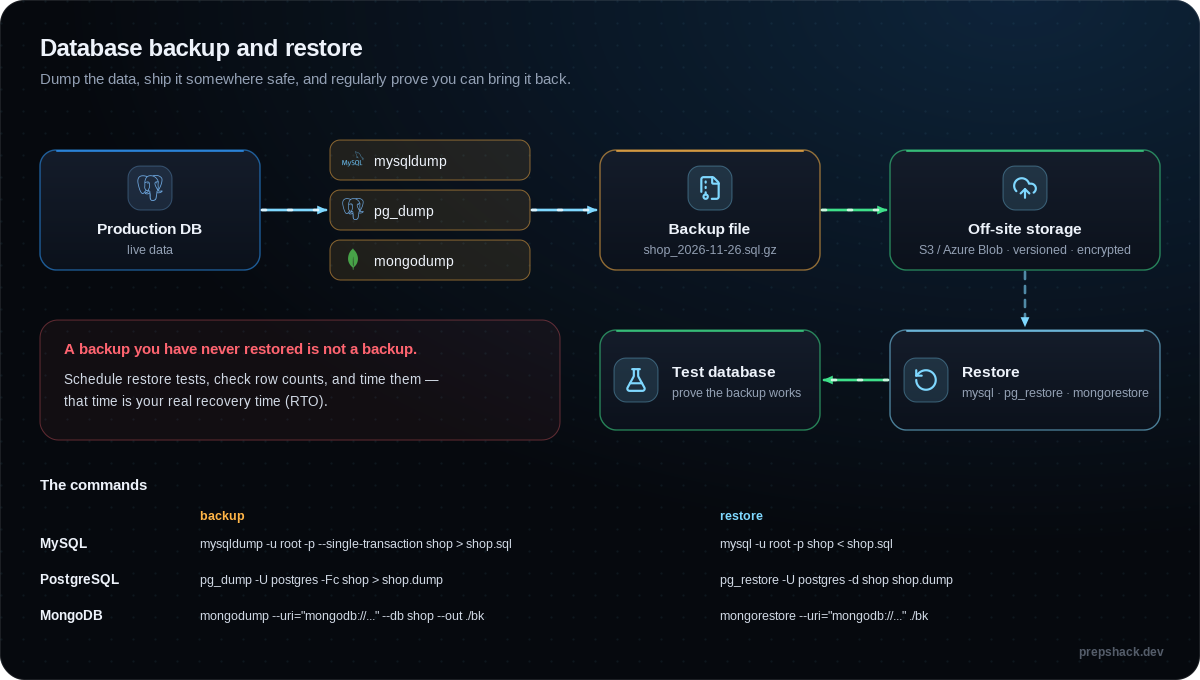
# Custom format (-Fc): compressed, and lets you restore selectively
pg_dump -h localhost -U postgres -Fc shop > shop_$(date +%F).dump

# Plain SQL file
pg_dump -U postgres shop > shop.sql

# Every database plus roles
pg_dumpall -U postgres > all.sql

# Restore a custom-format dump into a new database
createdb -U postgres shop_restore
pg_restore -U postgres -d shop_restore --no-owner shop_2026-11-26.dump

# Restore a plain SQL dump
psql -U postgres -d shop_restore -f shop.sql

# Docker
docker exec postgres pg_dump -U postgres -Fc shop > shop.dump
pg_dumptakes a consistent snapshot while the database stays online.-j 4with the directory format (-Fd) dumps and restores in parallel — much faster for big databases.- For point-in-time recovery, production setups use WAL archiving (tools like pgBackRest or Barman) or managed service snapshots.
8. Extensions and managed Postgres
Extensions add features with one command:
CREATE EXTENSION IF NOT EXISTS pg_stat_statements;   -- track the slowest queries
CREATE EXTENSION IF NOT EXISTS pgcrypto;             -- hashing / encryption functions
CREATE EXTENSION IF NOT EXISTS vector;               -- pgvector: embeddings for AI / RAG apps
Managed Postgres: Amazon RDS for PostgreSQL / Aurora PostgreSQL, Azure Database for PostgreSQL – Flexible Server and Google Cloud SQL handle backups, patching, high availability and replicas. You connect with psql and manage roles exactly as above; you simply can't log in to the server's operating system. In Kubernetes, operators like CloudNativePG run Postgres clusters with automated failover.
9. Common problems
| Problem | Cause | Fix |
|---|---|---|
no pg_hba.conf entry for host |
Client IP/user/database not allowed | Add a pg_hba.conf line, reload |
password authentication failed for user |
Wrong password or role lacks LOGIN | Reset the password, check \du |
could not connect ... Connection refused |
Server down or listen_addresses is localhost |
Start it / set listen_addresses |
FATAL: sorry, too many clients already |
max_connections reached |
Pool connections (PgBouncer), reduce pool sizes |
permission denied for table orders |
Role lacks GRANT on the table/schema | Grant USAGE on schema + SELECT/etc. on tables |
| Database keeps growing | Dead rows not cleaned (bloat) | Check autovacuum is running and keeping up |
10. Key terms at a glance
| Term | Meaning in one line |
|---|---|
| psql | PostgreSQL's command-line client |
| Role | A user or group; a user is a role with LOGIN |
| Schema | A folder of tables inside a database (default public) |
pg_hba.conf |
Rules for who may connect, from where, and how |
\l, \c, \dt, \d |
List databases, connect, list tables, describe |
| SERIAL | Auto-incrementing integer column |
| JSONB | Native, indexable JSON column type |
| pg_dump / pg_restore | Logical backup and restore |
| WAL | Write-ahead log, used for replication and point-in-time recovery |
| Extension | Add-on feature, e.g. pgvector, pg_stat_statements |