1. What MongoDB is
MongoDB is a document database: instead of tables with fixed columns, it stores data as flexible JSON-like documents. It belongs to the "NoSQL" family. Teams pick it for product catalogs, user profiles, content, event logs and anything where the shape of the data changes often or is naturally nested.
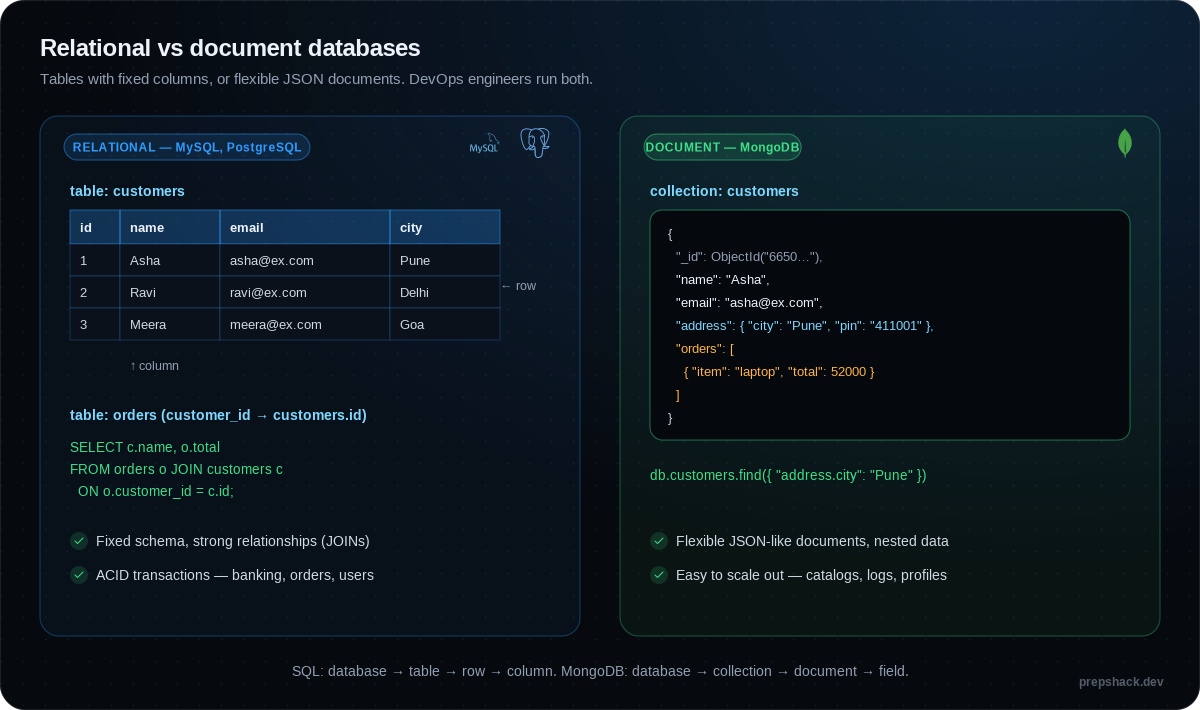
The words map like this:
| SQL (MySQL / Postgres) | MongoDB |
|---|---|
| Database | Database |
| Table | Collection |
| Row | Document |
| Column | Field |
| Primary key | _id (added automatically) |
| JOIN | Embedded documents, or $lookup |
A document looks like this:
{
  "_id": ObjectId("6650f1c2a7b3e4d5f6a7b8c9"),
  "name": "Asha",
  "email": "[email protected]",
  "address": { "city": "Pune", "pin": "411001" },
  "tags": ["premium", "early-adopter"],
  "orders": [
    { "item": "laptop", "total": 52000 },
    { "item": "mouse",  "total": 899 }
  ]
}
Notice: nested objects (address), arrays (tags, orders) and no fixed schema — the next document in the same collection could have different fields. Internally Mongo stores documents in a binary format called BSON.
MongoDB listens on port 27017.
2. Run MongoDB in Docker
docker run -d --name mongo \
  -e MONGO_INITDB_ROOT_USERNAME=admin \
  -e MONGO_INITDB_ROOT_PASSWORD=adminpass \
  -p 27017:27017 \
  -v mongo-data:/data/db \
  mongo:7

docker logs -f mongo     # wait for "Waiting for connections"
- The two
MONGO_INITDB_*variables create an admin user and turn on authentication. Without them, Mongo starts with no login required — dangerous if the port is ever exposed. (Thousands of open MongoDB servers have been wiped by attackers for exactly this reason.) -v mongo-data:/data/dbkeeps your data when the container is removed.
On Ubuntu you'd install the mongodb-org package from MongoDB's own apt repository and start the mongod service; config is in /etc/mongod.conf (net.bindIp controls which interfaces it listens on, security.authorization: enabled turns on auth).
3. Connect with mongosh
mongosh is the MongoDB shell — a JavaScript-based command line.
docker exec -it mongo mongosh -u admin -p --authenticationDatabase admin
mongosh "mongodb://admin@localhost:27017/?authSource=admin"
mongosh "mongodb://shop_app@mongo1:27017,mongo2:27017,mongo3:27017/shop?replicaSet=rs0"
mongosh "mongodb+srv://[email protected]/shop"      # Atlas
authSource=adminsays which database the user was created in.mongodb+srv://uses DNS to discover all members of a cluster — that's how MongoDB Atlas connection strings look.
4. Look around
show dbs                    // list databases (empty ones don't appear)
use shop                    // switch to "shop" — created automatically on first insert
show collections            // list collections in this database
db                          // which database am I in?
db.customers.countDocuments()
db.stats()                  // size of the current database
db.serverStatus().connections   // how many connections are open
5. Create a user for the app
use shop
db.createUser({
  user: "shop_app",
  pwd: "Str0ng-Pass!",
  roles: [ { role: "readWrite", db: "shop" } ]     // read and write only this database
})

db.getUsers()
db.changeUserPassword("shop_app", "N3w-Pass!")
Built-in roles you'll use: read, readWrite, dbAdmin (indexes, stats) and, for operators only, root. Same rule as SQL databases: give the app the smallest role that works.
6. CRUD: insert, find, update, delete
use shop

// CREATE
db.customers.insertOne({ name: "Asha", email: "[email protected]", address: { city: "Pune" } })
db.customers.insertMany([
  { name: "Ravi",  email: "[email protected]",  address: { city: "Delhi" }, tags: ["premium"] },
  { name: "Meera", email: "[email protected]", address: { city: "Goa" } }
])

// READ
db.customers.find()                                     // everything
db.customers.find({ "address.city": "Pune" })           // filter on a nested field
db.customers.find({ tags: "premium" })                  // array contains "premium"
db.customers.find({}, { name: 1, email: 1, _id: 0 })    // only some fields (projection)
db.customers.findOne({ email: "[email protected]" })
db.orders.find({ total: { $gt: 1000 } }).sort({ total: -1 }).limit(5)   // > 1000, biggest first

// UPDATE
db.customers.updateOne(
  { email: "[email protected]" },
  { $set: { "address.city": "Mumbai" }, $push: { tags: "moved" } }
)
db.orders.updateMany({ status: "NEW" }, { $set: { status: "PROCESSING" } })

// DELETE
db.customers.deleteOne({ email: "[email protected]" })
db.orders.deleteMany({ status: "CANCELLED" })
- Query operators start with
$:$gt(greater than),$lt,$in,$ne,$exists,$regex. - Update operators:
$set(change fields),$unset(remove a field),$inc(add to a number),$push(add to an array). updateOne({}, ...)with an empty filter matches any document anddeleteMany({})deletes everything — always double-check the filter, just likeWHEREin SQL.
Indexes
Without an index, every query scans the whole collection. Add indexes on the fields you search by:
db.customers.createIndex({ email: 1 }, { unique: true })
db.orders.createIndex({ customerId: 1, createdAt: -1 })
db.orders.find({ customerId: 42 }).explain("executionStats")   // did it use an index?
7. Backup and restore: mongodump and mongorestore
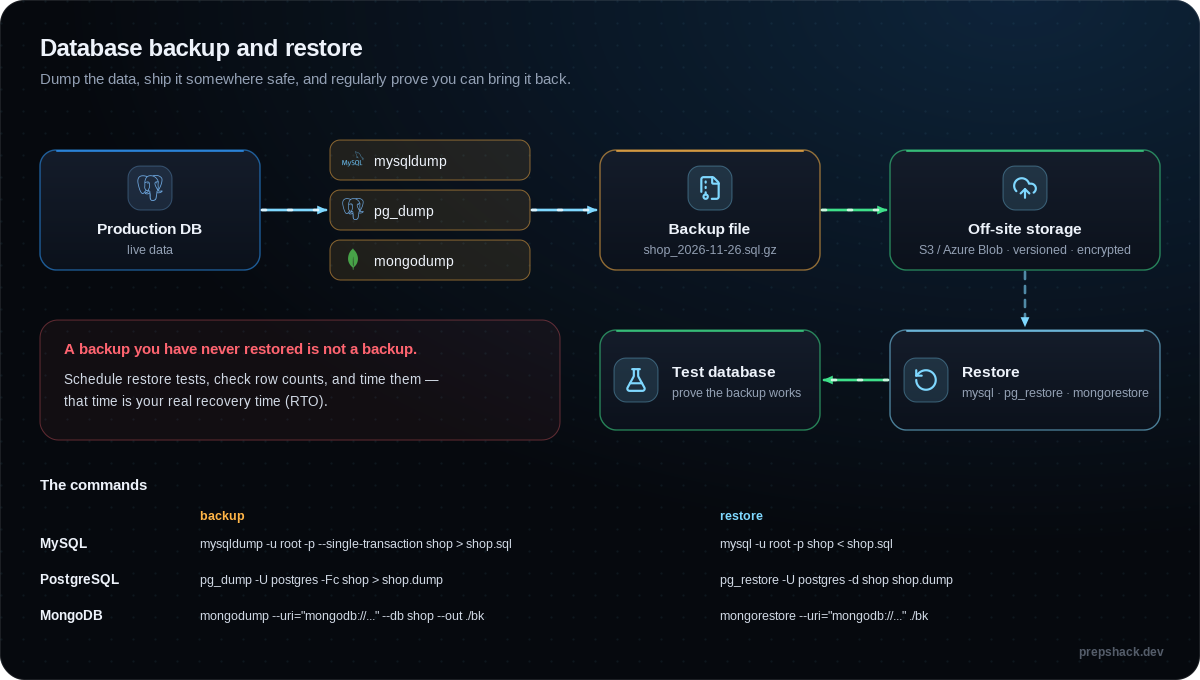
# Back up one database into a folder of BSON files
mongodump --uri="mongodb://admin:adminpass@localhost:27017/?authSource=admin" --db shop --out ./backup-$(date +%F)

# One compressed archive file — easier to upload to S3/Blob
mongodump --uri="mongodb://admin:adminpass@localhost:27017/?authSource=admin" --db shop --archive=shop.gz --gzip

# Restore
mongorestore --uri="mongodb://admin:adminpass@localhost:27017/?authSource=admin" ./backup-2026-11-26
mongorestore --uri="..." --archive=shop.gz --gzip --nsFrom="shop.*" --nsTo="shop_restore.*"   # into a new name

# Docker
docker exec mongo mongodump -u admin -p adminpass --authenticationDatabase admin --db shop --archive --gzip > shop.gz
--drop on restore drops each collection before restoring it — useful for a clean restore, dangerous if pointed at the wrong server.
8. Replica sets and MongoDB Atlas
- A replica set is a group of
mongodservers (usually 3) holding the same data. One is the primary (takes writes), the others are secondaries that copy it. If the primary fails, the others elect a new primary automatically within seconds. Production MongoDB always runs as a replica set.rs.status()shows the members and their state. - Sharding splits a huge collection across several replica sets by a shard key — for very large datasets.
- MongoDB Atlas is MongoDB's managed cloud service (on AWS, Azure or GCP): automatic backups, scaling, monitoring and replica sets out of the box. You connect with a
mongodb+srv://string and must add your app's IPs to the IP access list. Amazon DocumentDB and Azure Cosmos DB for MongoDB are cloud services that speak the MongoDB API.
9. Common problems
| Problem | Cause | Fix |
|---|---|---|
Authentication failed |
Wrong user/password or wrong authSource |
Add ?authSource=admin (or the DB the user lives in) |
connection timed out to Atlas |
App IP not in Atlas access list / firewall | Add the NAT/egress IP to the access list |
not primary errors on writes |
Connected to a secondary directly | Use the replica set connection string with replicaSet= |
| Slow queries | No index on the filtered field | explain(), then createIndex |
| Data gone after container restart | No volume mounted | Mount /data/db to a volume |
| Database open to the internet | Auth off and bindIp 0.0.0.0 |
Enable auth, bind privately, restrict the port |
10. Key terms at a glance
| Term | Meaning in one line |
|---|---|
| Document | A JSON-like record (stored as BSON) |
| Collection | A group of documents — like a table |
_id |
Unique identifier added to every document |
| mongosh | The MongoDB shell |
insertOne / find / updateOne / deleteOne |
The core CRUD commands |
$set, $gt, $in |
Update and query operators |
| Index | Speeds up queries on a field |
| Replica set | Primary + secondaries with automatic failover |
| Sharding | Splitting data across many replica sets |
| mongodump / mongorestore | Backup and restore tools |
| Atlas | MongoDB's managed cloud service |