1. What is DevOps?
DevOps is a way of working where the people who build software (Development) and the people who run it (Operations) work as one team, with one goal: deliver changes to users quickly and safely.
Think of a restaurant. The chefs (developers) cook the food, and the waiters (operations) serve it to customers. If the chefs and waiters never talk, food goes out cold, orders get mixed up and everyone blames each other. When they work as one team — with a clear process, a shared goal and quick feedback from customers — food goes out fast and right.
DevOps is that teamwork, applied to software. It has three parts:
- Culture — developers and operations share ownership of the app, including when it breaks in production.
- Practices — automate repeated work: building, testing, deploying and monitoring.
- Tools — Git, Jenkins, GitHub Actions, Docker, Kubernetes, Terraform, Prometheus and others make those practices possible.
Remember: DevOps is not a single tool or a job title. It is a way of working. "DevOps Engineer" is the person who builds the pipelines, infrastructure and automation that let a team work this way.
2. The problem DevOps solves
Before DevOps, developers and operations worked in separate teams with opposite goals:
- Developers were judged on shipping new features fast.
- Operations were judged on keeping the system stable — and every change is a risk to stability.
So developers "threw code over the wall" to operations, who deployed it by hand, often weeks later. When something broke, each side blamed the other.
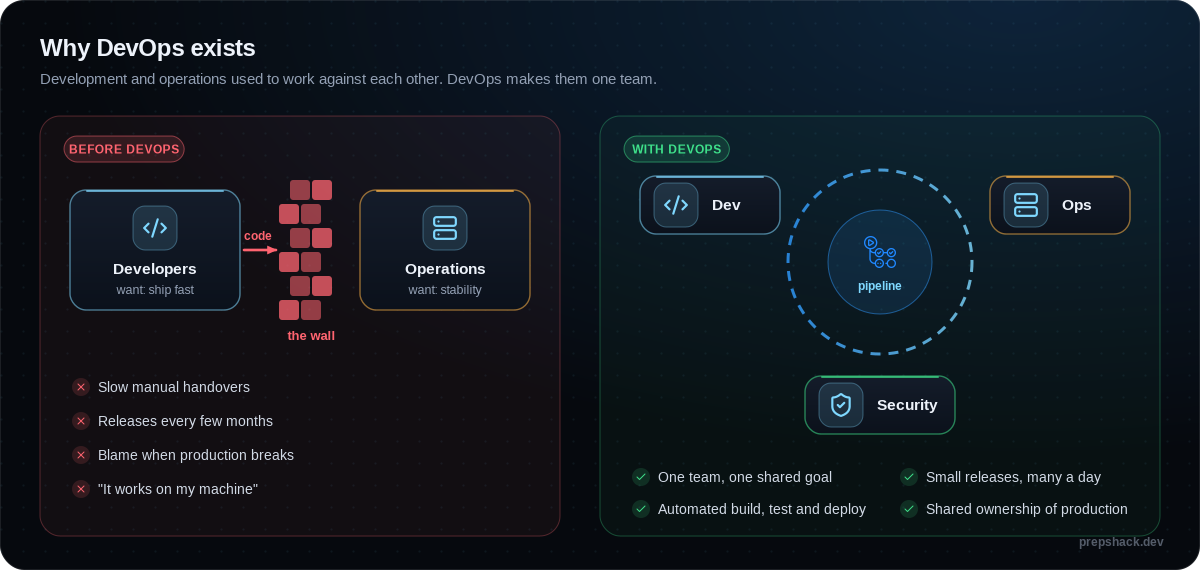
What went wrong without DevOps:
- Slow releases — big releases every few months, full of risky changes.
- Manual, error-prone deployments — a person following a long document at 2 a.m.
- "It works on my machine" — the app behaved differently in production than on the developer's laptop.
- Slow recovery — when production broke, nobody could quickly tell which change caused it.
How DevOps fixes it: one team, shared goals, small changes, automated pipelines and monitoring that shows problems within minutes.
3. The DevOps lifecycle
DevOps work runs as a loop. Every change goes through these eight stages, and what we learn from monitoring feeds the next round of planning.
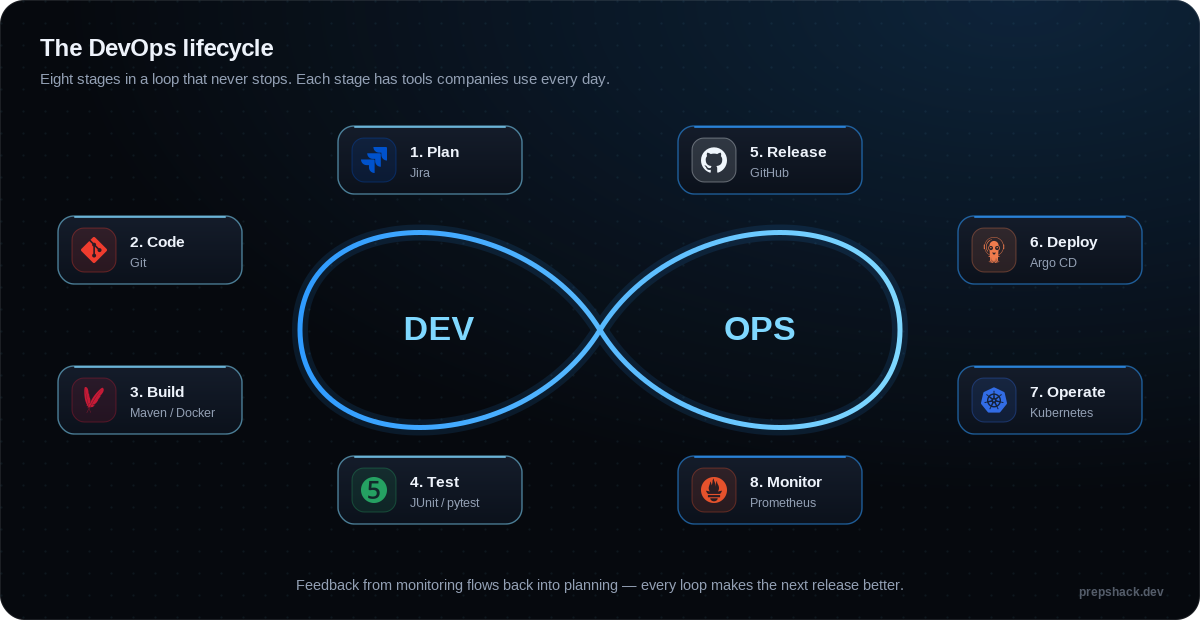
| Stage | What happens | Example tools |
|---|---|---|
| Plan | Decide what to build next | Jira, Azure Boards |
| Code | Write code and store it in version control | Git, GitHub, GitLab |
| Build | Turn code into something that can run | Maven, npm, Docker |
| Test | Check it works automatically | JUnit, pytest, Selenium |
| Release | Mark a version as ready to ship | GitHub Releases, tags |
| Deploy | Put it on servers or Kubernetes | Argo CD, Helm, Jenkins |
| Operate | Keep it running and scaled | Kubernetes, Terraform |
| Monitor | Watch health and user experience | Prometheus, Grafana |
4. The principles of DevOps
A simple way to remember them is CALMS:
- C — Culture: developers, operations and security work together and share responsibility. When something breaks, we fix the process, not blame a person.
- A — Automation: if a task is repeated, automate it — builds, tests, deployments, server setup.
- L — Lean: ship small changes often. Small changes are easier to test, review and roll back.
- M — Measurement: measure how you deliver (how often you deploy, how often deployments fail, how fast you recover).
- S — Sharing: share tools, knowledge and lessons from incidents so the whole team gets better.
5. Benefits of DevOps
- Faster delivery — features reach users in days or hours, not months.
- Fewer failures — small, tested changes break things less often.
- Faster recovery — monitoring finds problems quickly, and rollbacks take minutes.
- Consistent environments — containers and infrastructure as code make dev, test and production behave the same.
- Happier teams — less firefighting, fewer late-night manual releases, less blame.
- Security built in — with DevSecOps, security checks run on every change automatically.
6. CI/CD — the heart of DevOps
CI/CD is the automated pipeline that takes a code change from a developer's laptop to production.
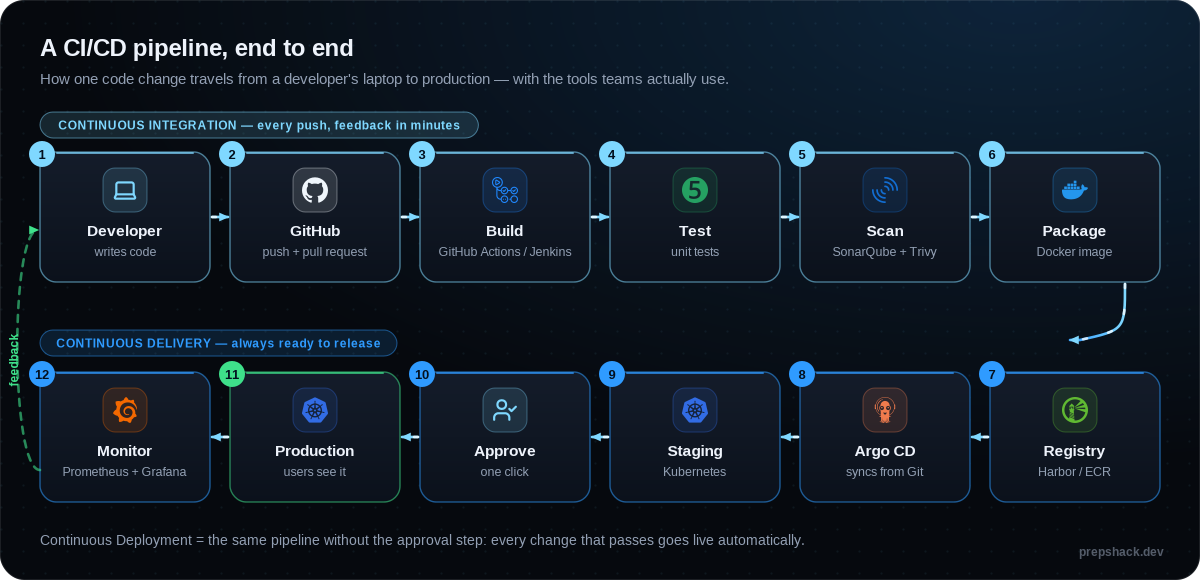
- Continuous Integration (CI): every time a developer pushes code, the pipeline builds it, runs tests and scans it. Problems show up within minutes, while the change is still fresh in the developer's mind.
- Continuous Delivery: every change that passes the pipeline is ready to release. A person clicks "approve" for the final production step.
- Continuous Deployment: the same, but without the manual approval — every passing change goes live automatically.
7. Deployment strategies
A deployment strategy is how you replace the old version of your app (v1) with the new one (v2) in production. A good strategy keeps the app available and makes it easy to go back if v2 has a problem.
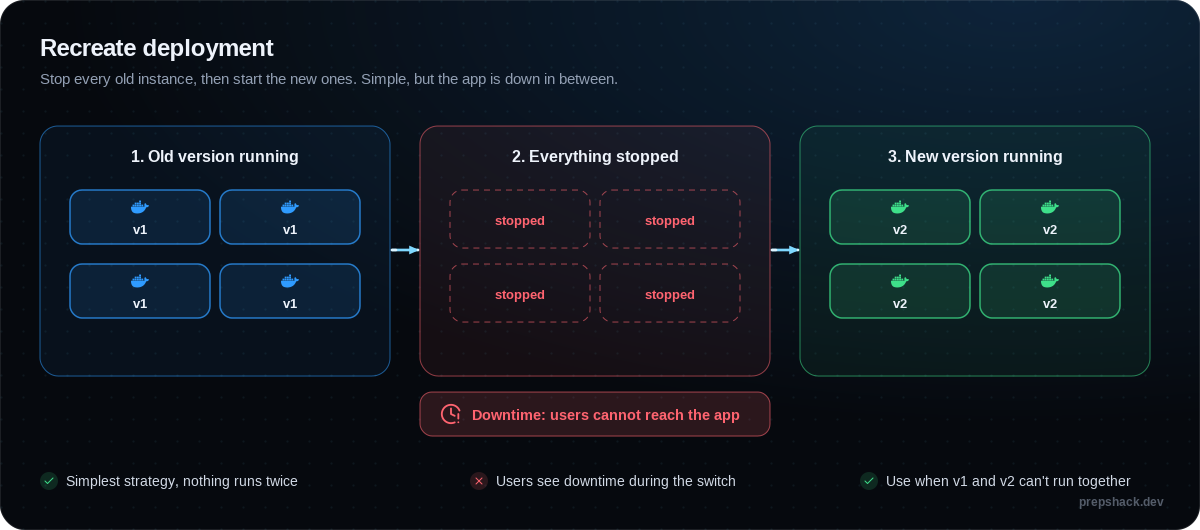
Recreate
Stop everything old, then start everything new. Simple, but users see downtime in between.
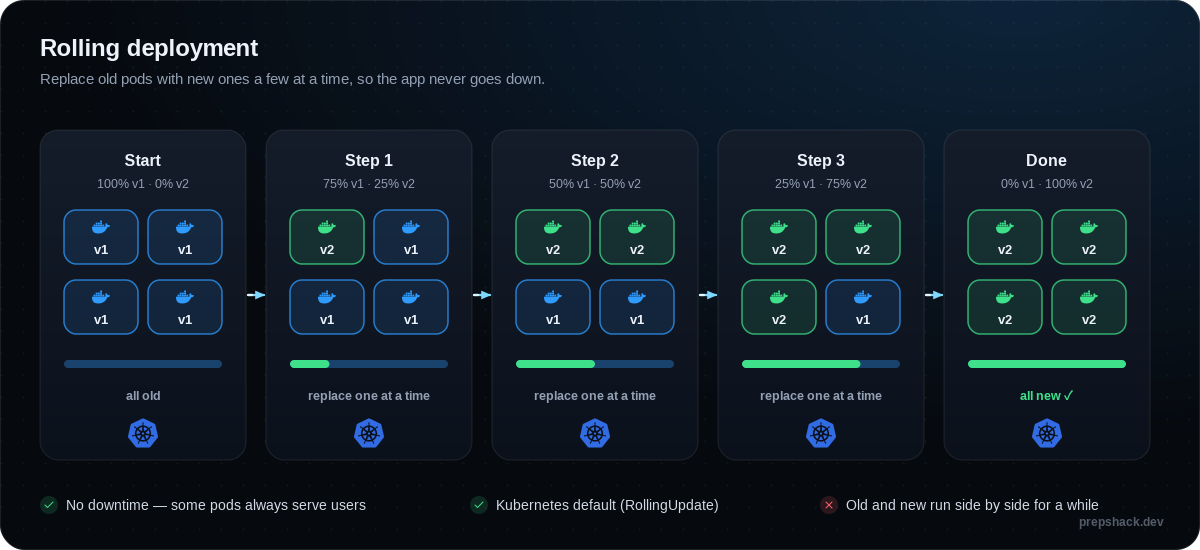
Rolling
Replace old instances with new ones a few at a time. There is no downtime, and it is the default in Kubernetes.
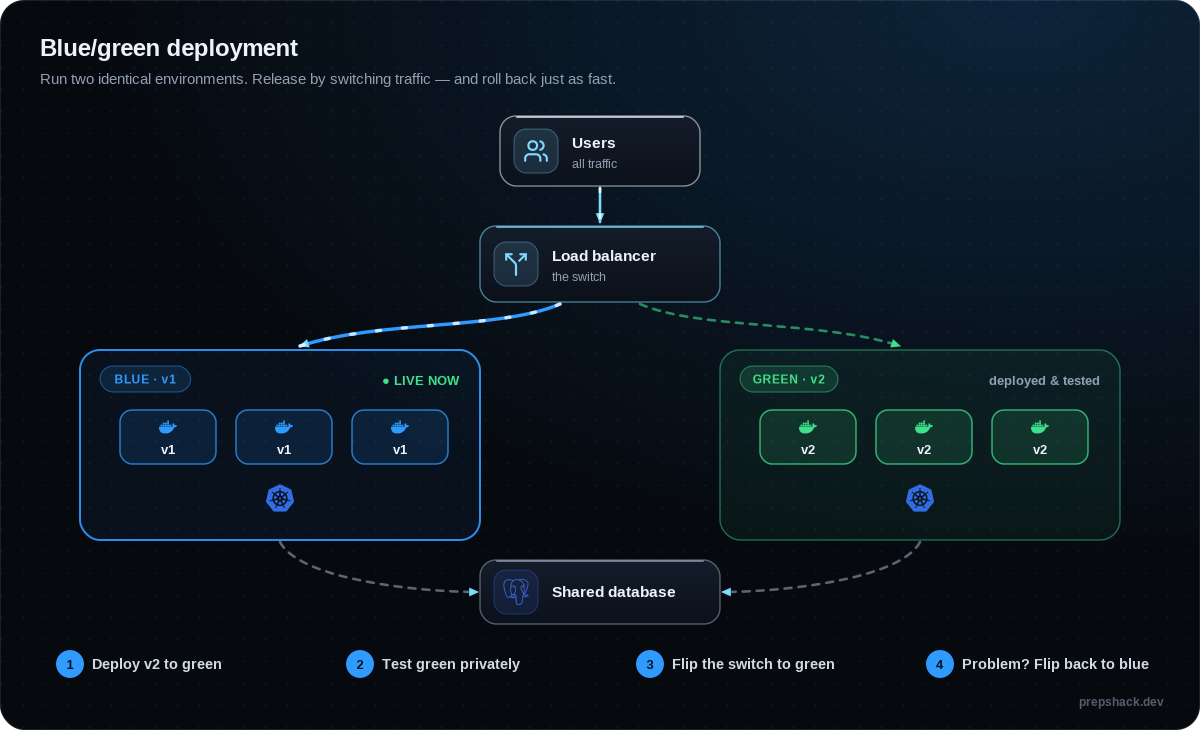
Blue/green
Run two identical environments. Users stay on blue (v1) while you deploy and test green (v2). Then you flip the load balancer to green. If anything goes wrong, you flip back in seconds.
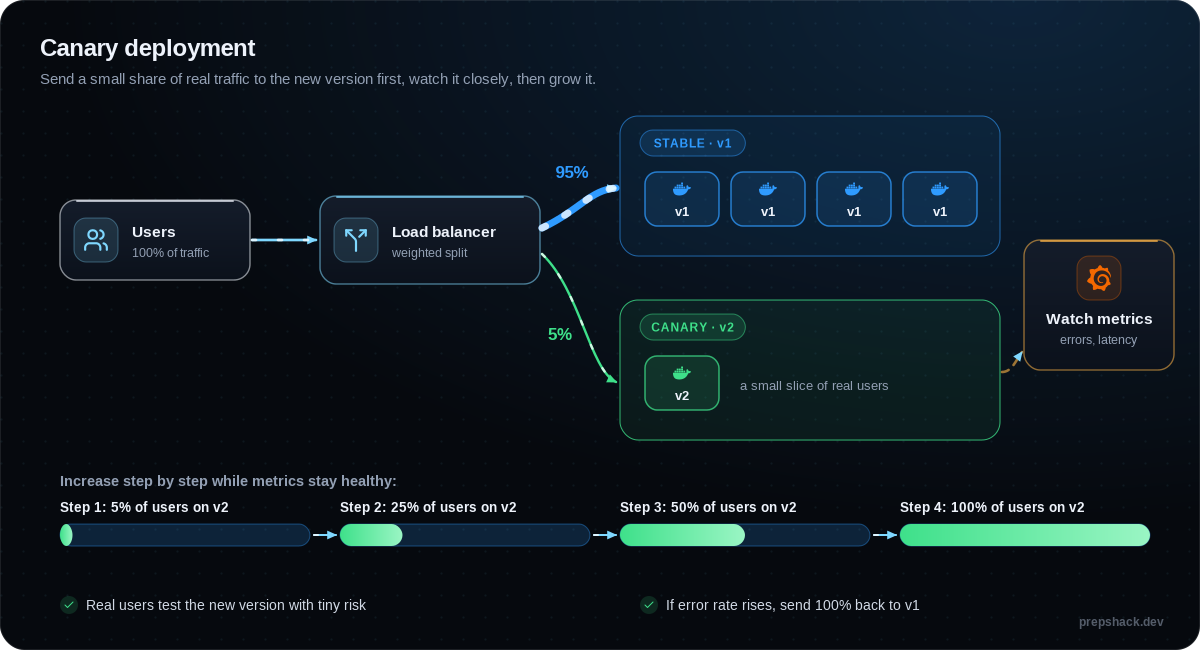
Canary
Send a small share of real users (for example 5%) to v2 first. Watch error rates and latency. If everything is healthy, increase step by step until 100% of users are on v2.
Feature flags
A feature flag is an on/off switch in the code. You can deploy a new feature hidden, then turn it on for staff, then 10% of users, then everyone — without a new deployment. If it causes problems, you turn it off in seconds.
Which one should you use?
| Strategy | Downtime? | Rollback speed | Extra cost | Use it when… |
|---|---|---|---|---|
| Recreate | Yes | Slow | None | Short downtime is fine, or v1 and v2 can't run together |
| Rolling | No | Medium | None | Most everyday deployments on Kubernetes |
| Blue/green | No | Instant | Double environment during release | You need instant rollback for important releases |
| Canary | No | Fast | Small | You want to test with real users at low risk |
| Feature flags | No | Instant (flip the flag) | Flag tooling | You want to release features separately from deployments |
8. What is DevSecOps?
DevSecOps adds security to every stage of the DevOps pipeline, instead of checking security only at the end.
In the old way, a security team reviewed the app just before release. Problems found that late were expensive to fix and delayed the release. In DevSecOps, automated security checks run on every change — so problems are found while they are still small and cheap to fix. This is called shift left: moving security earlier (to the left) in the timeline.
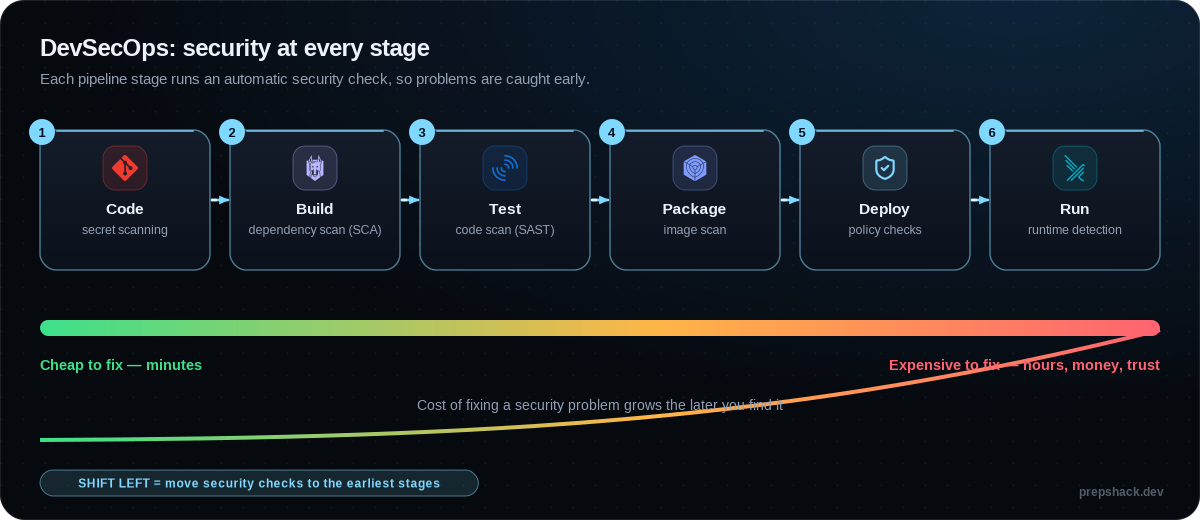
What DevSecOps checks, stage by stage:
- Code: stop passwords and API keys from being committed (secret scanning).
- Build: check third-party libraries for known vulnerabilities (SCA).
- Test: scan your own code for security bugs (SAST).
- Package: scan the Docker image for vulnerable packages.
- Deploy: block insecure settings with policy checks (for example, containers running as root).
- Run: watch for suspicious behaviour in production.
9. Key terms at a glance
| Term | Meaning in one line |
|---|---|
| Pipeline | The automated steps from commit to production |
| Artifact | The built output that gets deployed, such as a Docker image |
| Environment | A copy of the app for a purpose: dev, QA, staging, production |
| Infrastructure as Code | Creating servers and networks from code files, e.g. Terraform |
| GitOps | Git is the source of truth; a tool like Argo CD makes the cluster match Git |
| Rollback | Going back to the last working version |
| Shift left | Testing and security as early as possible |